Happy Robots for GoodHelp

API Setup Guides

Step-by-step instructions to connect your ad platforms for automated reporting. We only request read permissions—we cannot modify your data.

Connect Your Store

Link your Shopify store to enable sales and product reporting.

5-10 minutes

Connect Your Ads

Link your ad accounts for campaign performance data.

10-15 minutes

Install the Bot

Enable automated daily reports and alerts in your Slack workspace.

10 minutes

Connect Reddit Ads

Link your Reddit Ads account for campaign reporting.

10-15 minutes
Shopify

Shopify API Setup

Create a custom app that allows us to read your store data for automated reporting.

What This Does

Creates a custom Shopify app with READ-only permissions. We can view products, orders, and customers—but we cannot modify anything in your store.

Quick Path Settings → Apps → Develop apps → Create an app → Configure scopes → Install → Copy token

1 Create a Custom App

  1. Go to your Shopify admin: https://[your-store].myshopify.com/admin
  2. Click Settings (gear icon, bottom-left)
  3. Click AppsDevelop apps
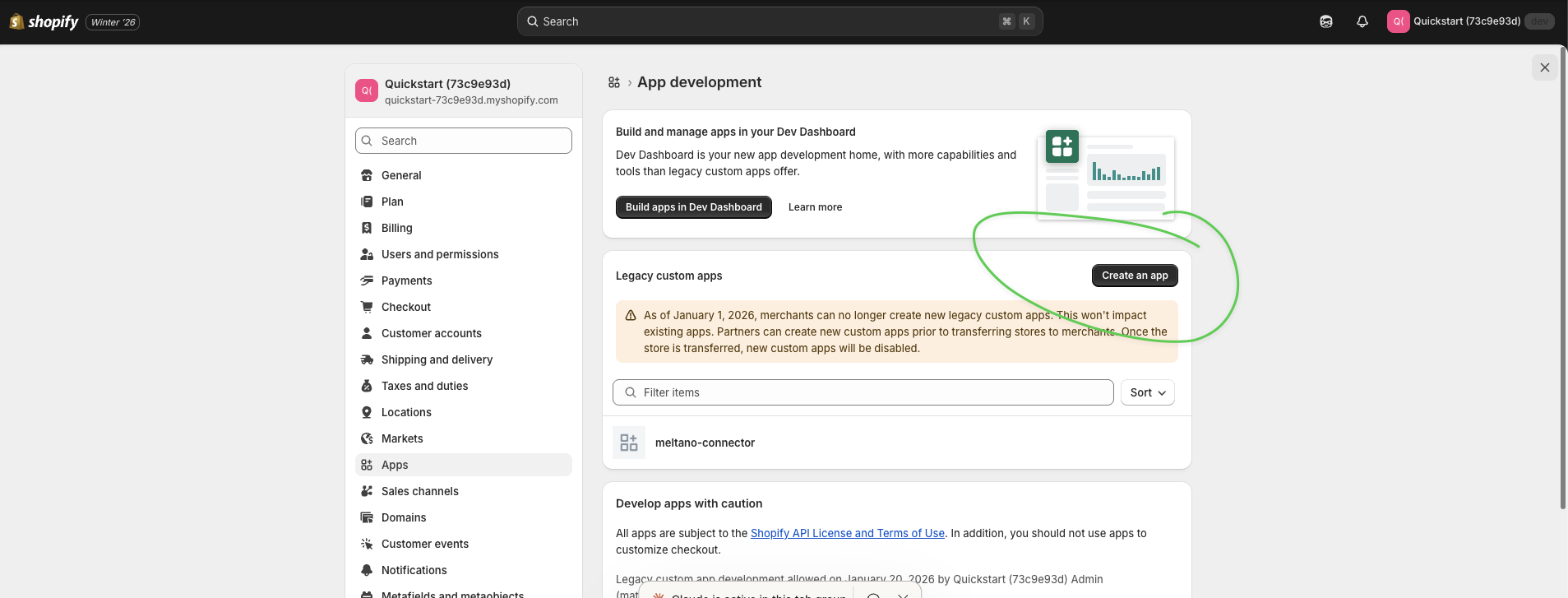
  4. Click Create an app button
  5. Name it: GoodHelp Reporting
Click Create an app button
Click the "Create an app" button

2 Configure API Scopes

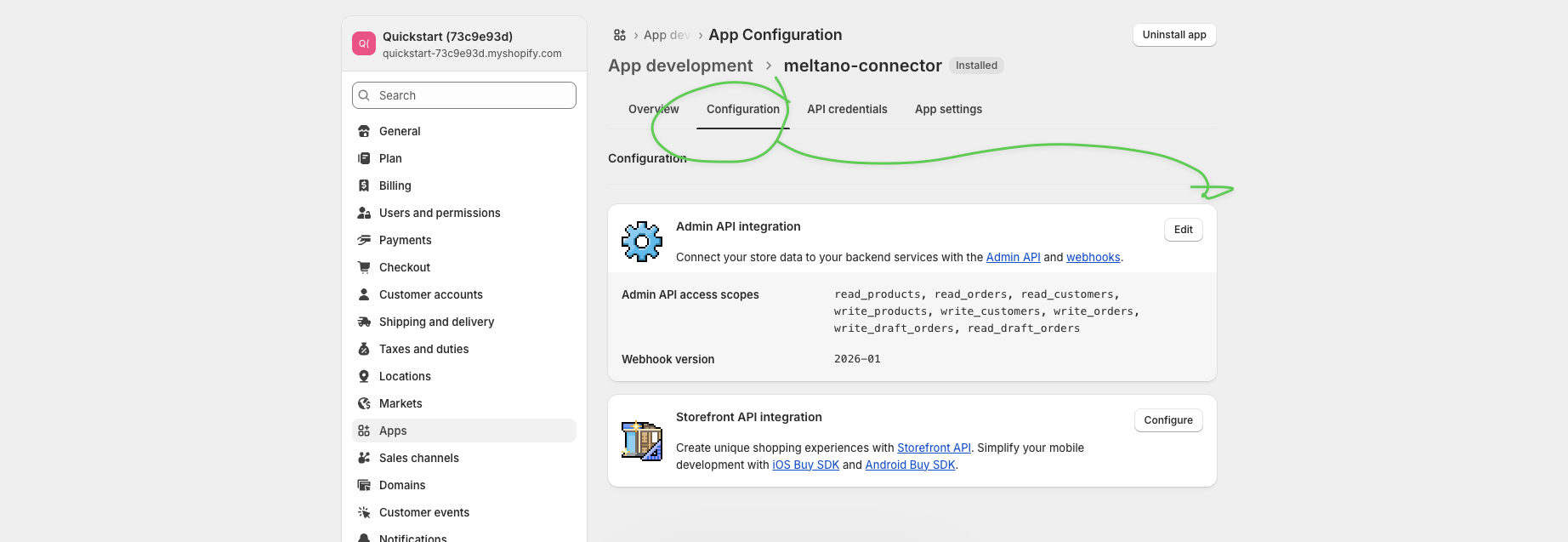
  1. After creating the app, click the Configuration tab
  2. Click the Edit button next to Admin API integration
  3. Check these scopes:
    • read_orders
    • read_products
    • read_customers
  4. Click Save
Configuration tab and Edit button
Click the Configuration tab, then click Edit to select API scopes

3 Install the App

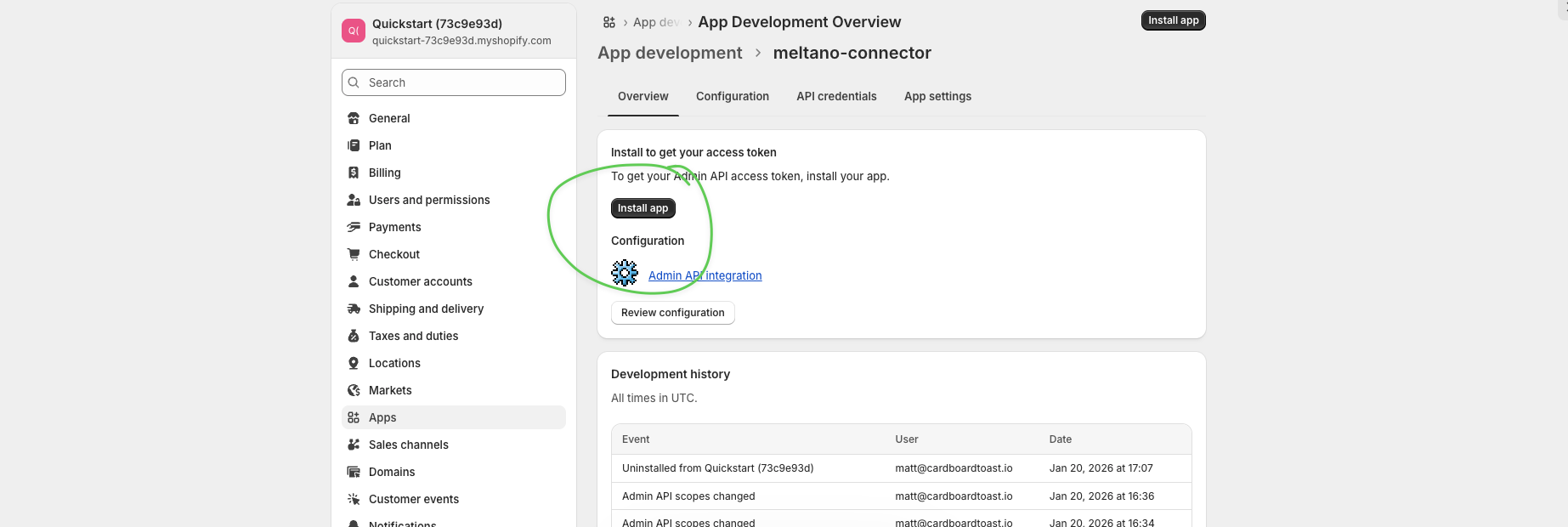
  1. Go back to the Overview tab
  2. Click the Install app button
Install app button
Click "Install app" to install the app on your store
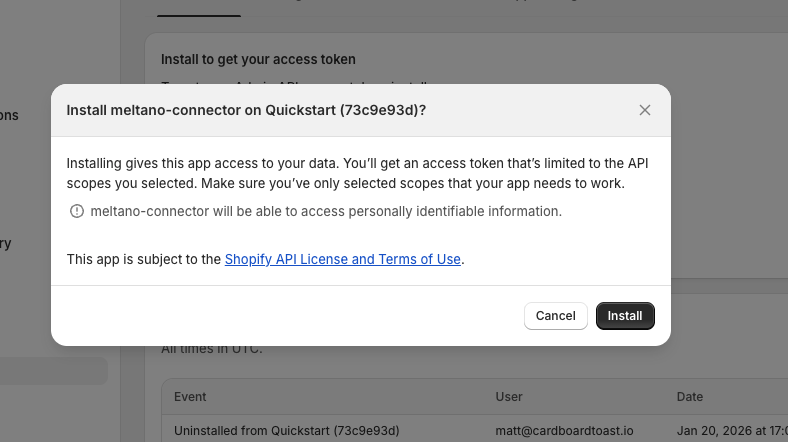
  1. In the confirmation dialog, click Install
Confirm installation dialog
Click "Install" to confirm

4 Get Your Access Token

Critical

The token is only shown ONCE. Have a secure place ready to paste it before clicking reveal.
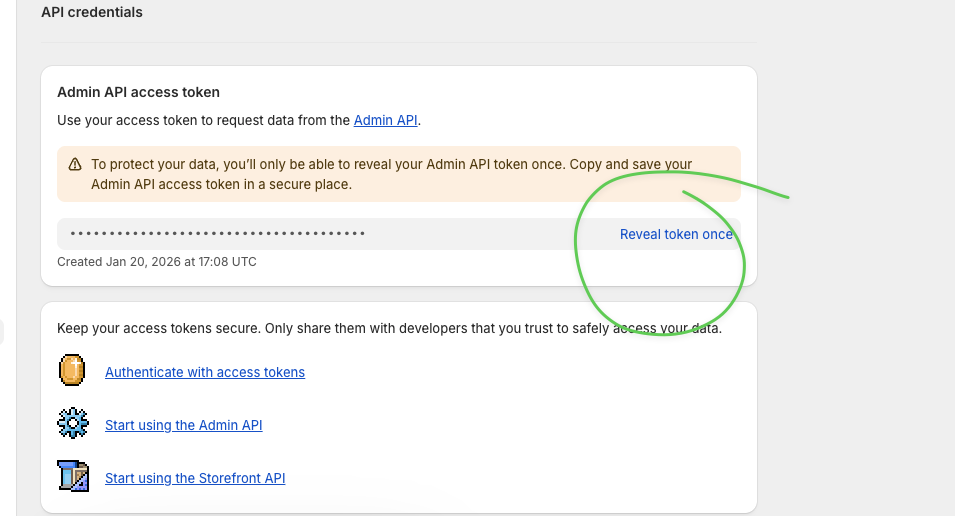
  1. After installing, you'll see "Reveal token once"—click it
Reveal token once button
Click "Reveal token once"—you only get one chance
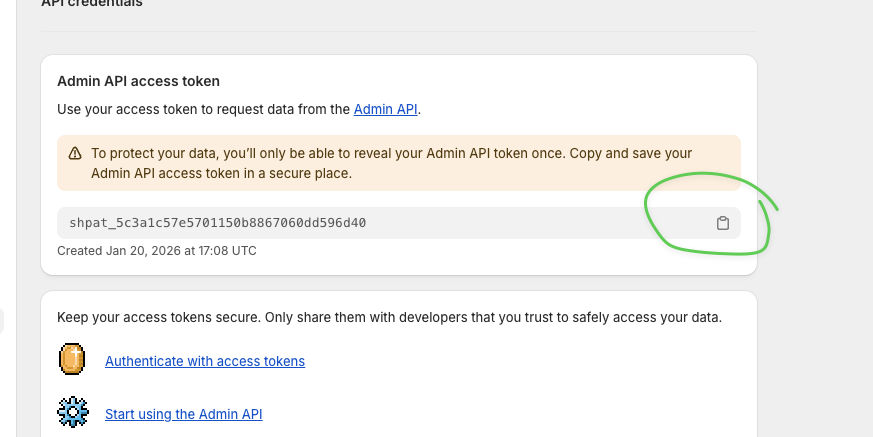
  1. Copy the token immediately using the copy button
Copy the token
Copy the token (starts with shpat_) and save it securely
Lost Your Token?

If you forgot to copy it, you'll need to uninstall and reinstall the app to generate a new one.

5 Send Us Your Credentials

What We Need Where to Find It Example
Store URL Your browser URL bar my-store.myshopify.com
Access Token From Step 4 above shpat_5c3a1c57e5701...
Meta / Facebook

Meta Ads API Setup

Create a Meta app and System User to read your ad account performance data.

What This Does

Creates a Meta app and System User with READ-only permissions. We can view campaigns, ad sets, ads, and performance metrics—but we cannot modify your ad accounts.
Quick Path Business Settings → Apps → Create App → App Settings → System Users → Assign Assets → Generate Token

1 Go to Business Settings

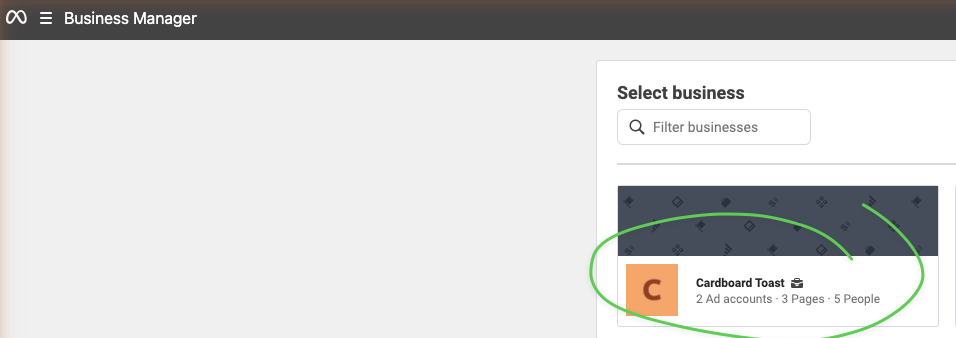
  1. Go to business.facebook.com
  2. Select your Business Account from the dropdown
Select business account
Select your business account
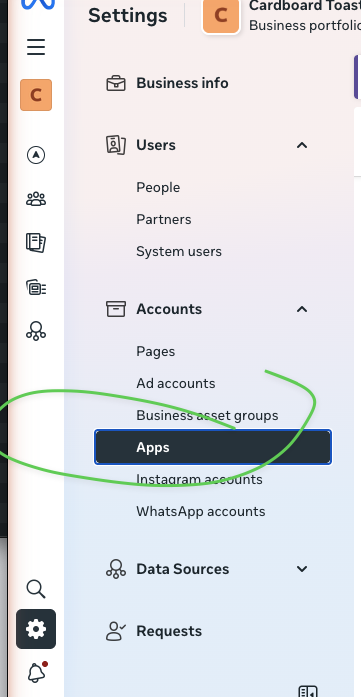
  1. Click the Settings gear icon
  2. In the left sidebar under Accounts, click Apps
Select Apps in sidebar
Navigate to Apps in Business Settings

2 Create a New App

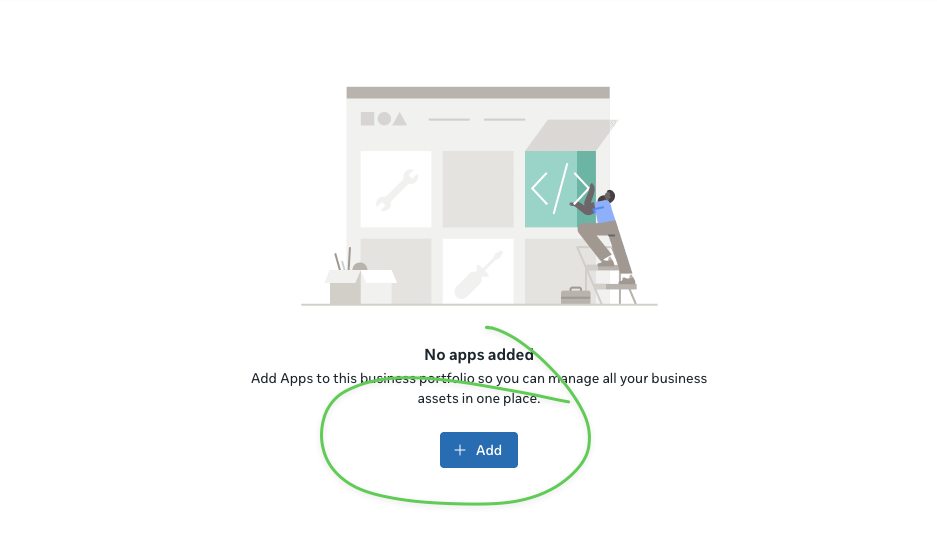
  1. Click the + Add button
Click Add button
Click "+ Add" to add a new app
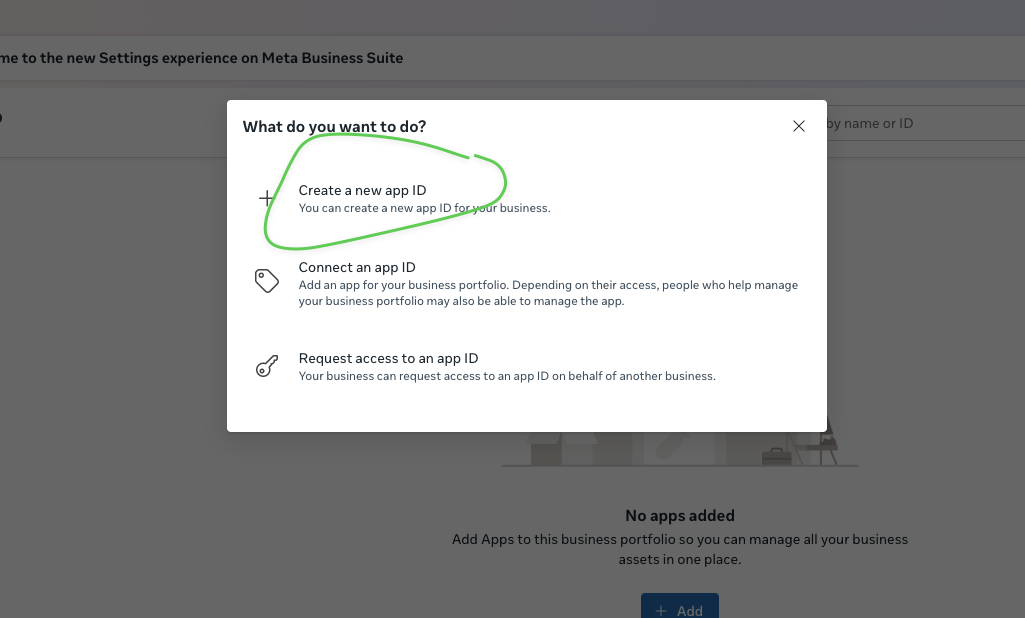
  1. Select "Create a new app ID"
Create new app ID
Select "Create a new app ID"
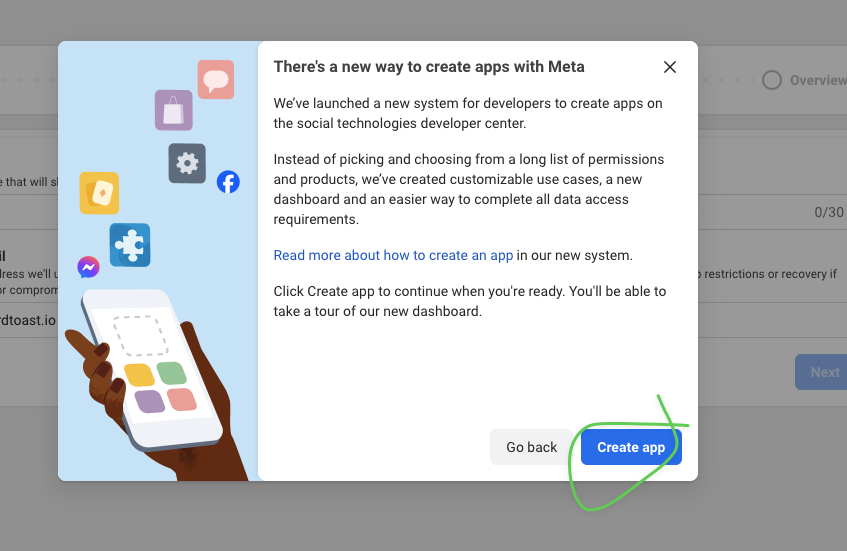
  1. Click Create app in the dialog
Create app dialog
Click "Create app" to continue

3 Configure App Details

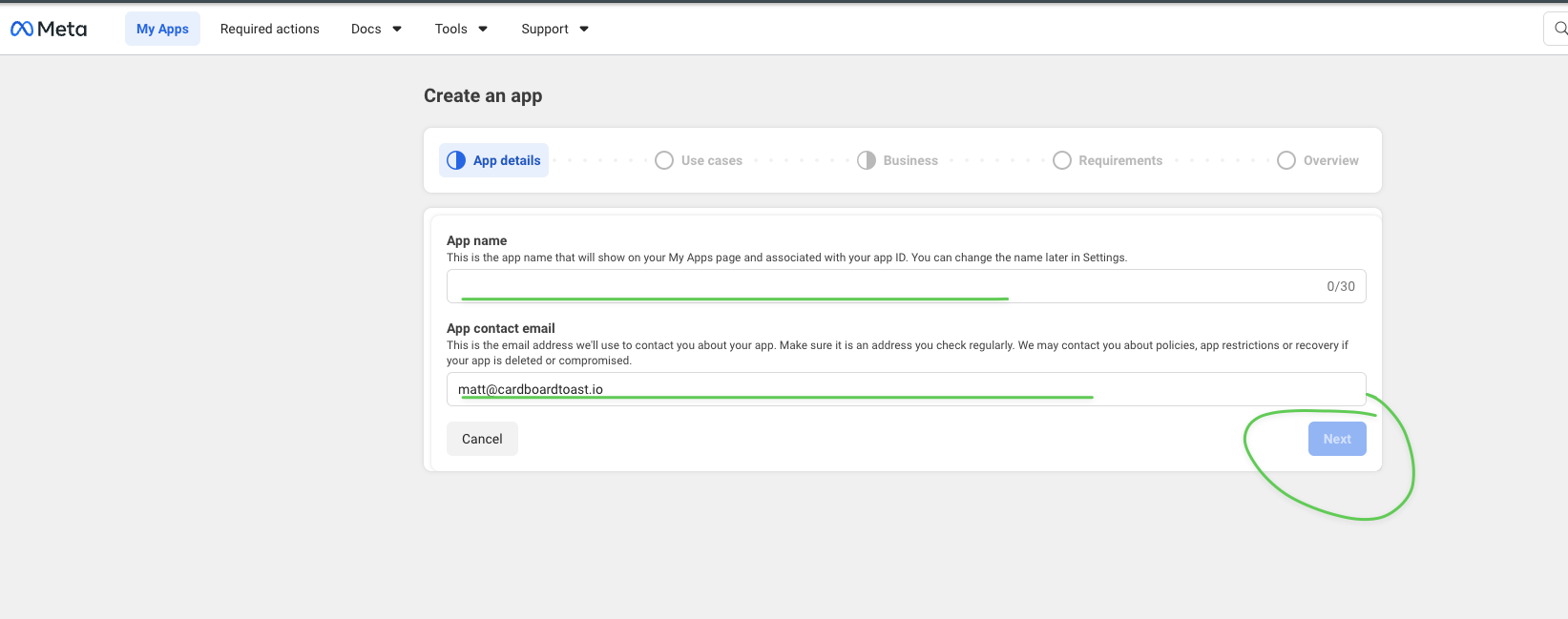
  1. Enter app name: GoodHelp Reporting
  2. Enter your contact email
  3. Click Next
App details form
Enter app name and contact email, then click Next
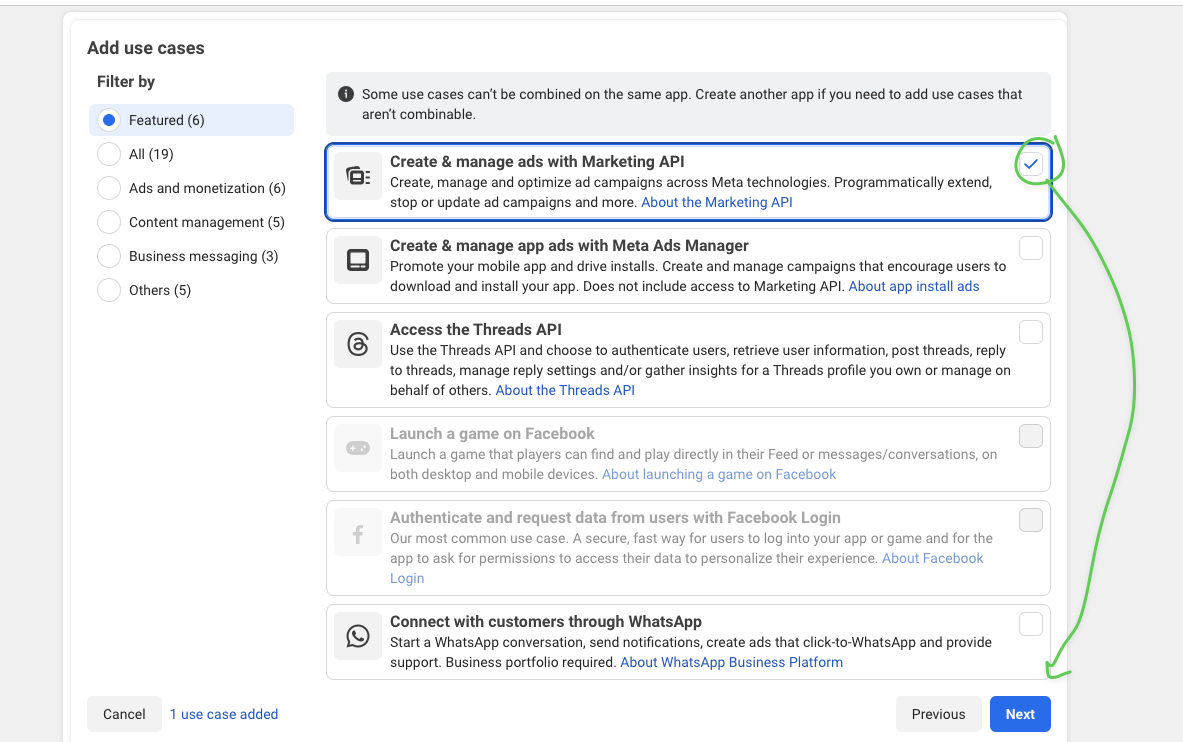
  1. Select use case: "Create & manage ads with Marketing API"
  2. Click Next
Select use case
Select "Create & manage ads with Marketing API" and click Next
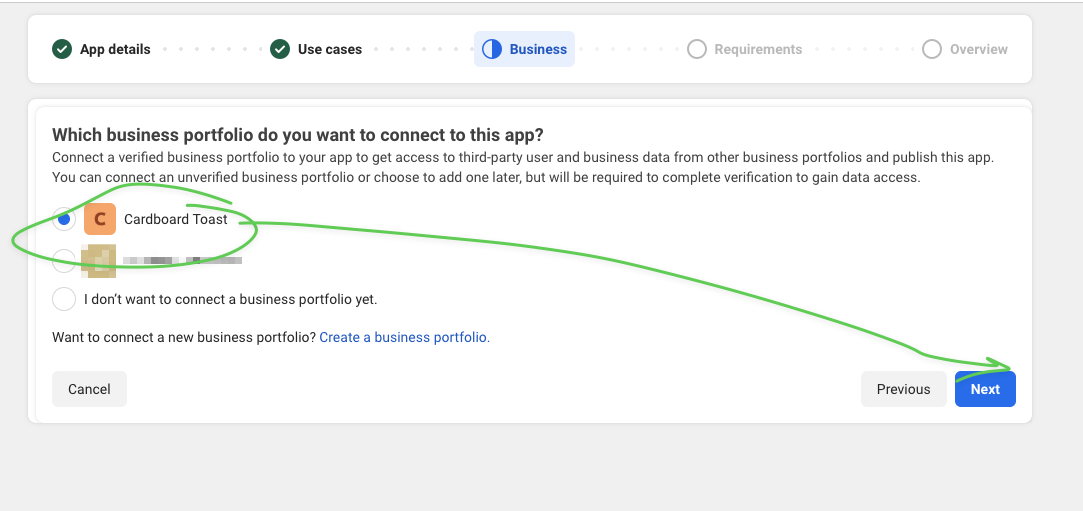
  1. Select your Business Portfolio
  2. Click Next
Select business portfolio
Select your business portfolio and click Next
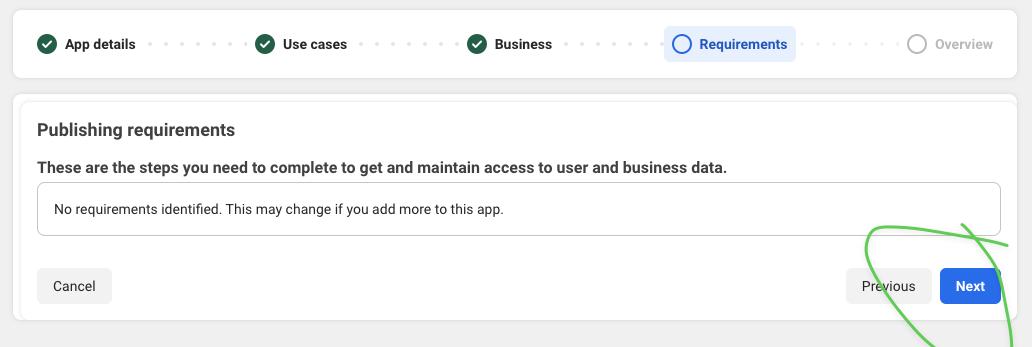
  1. Review requirements and click Next
Confirm requirements
Review requirements and click Next
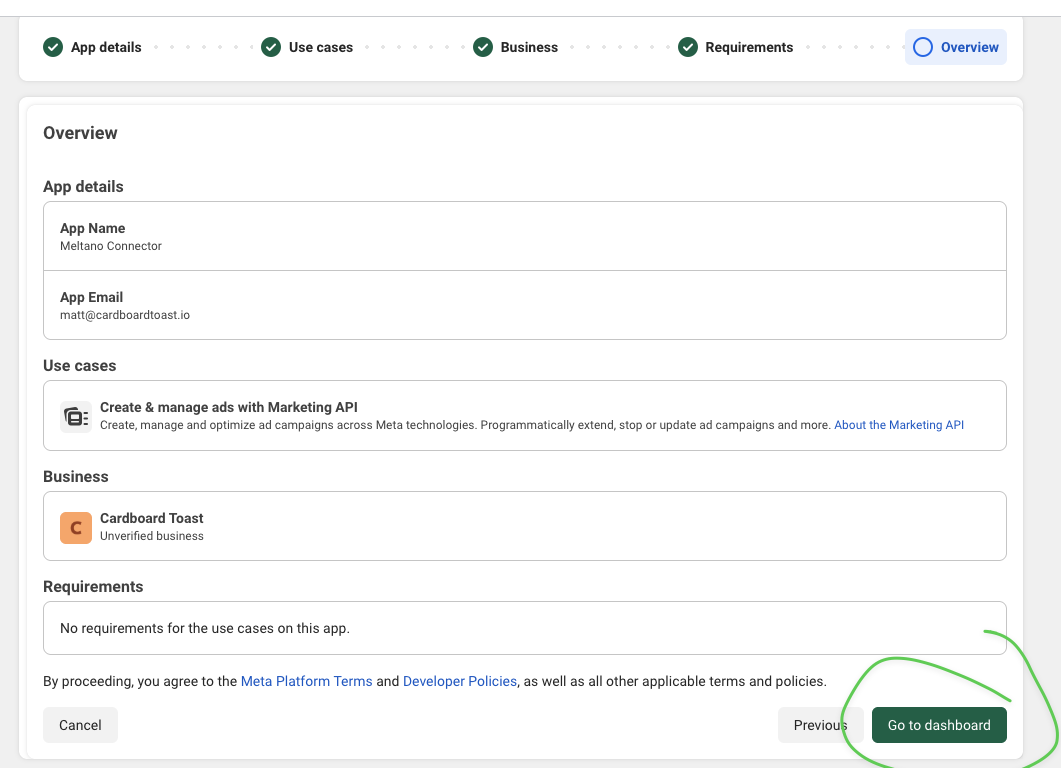
  1. Review the overview and click Go to dashboard
Go to dashboard
Click "Go to dashboard" to finish creating the app

4 Get App Credentials

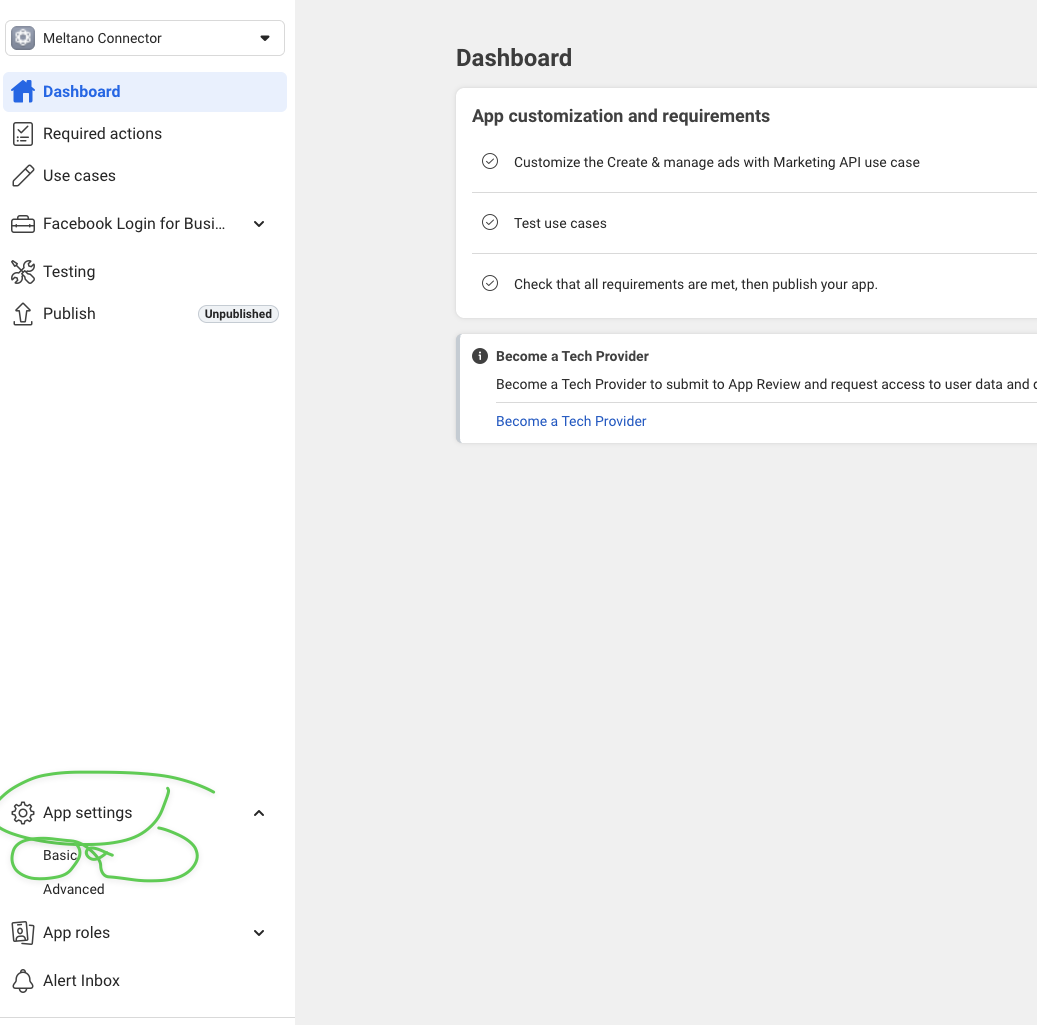
  1. In the app dashboard, click App settingsBasic
App settings basic
Go to App settings > Basic in the left sidebar
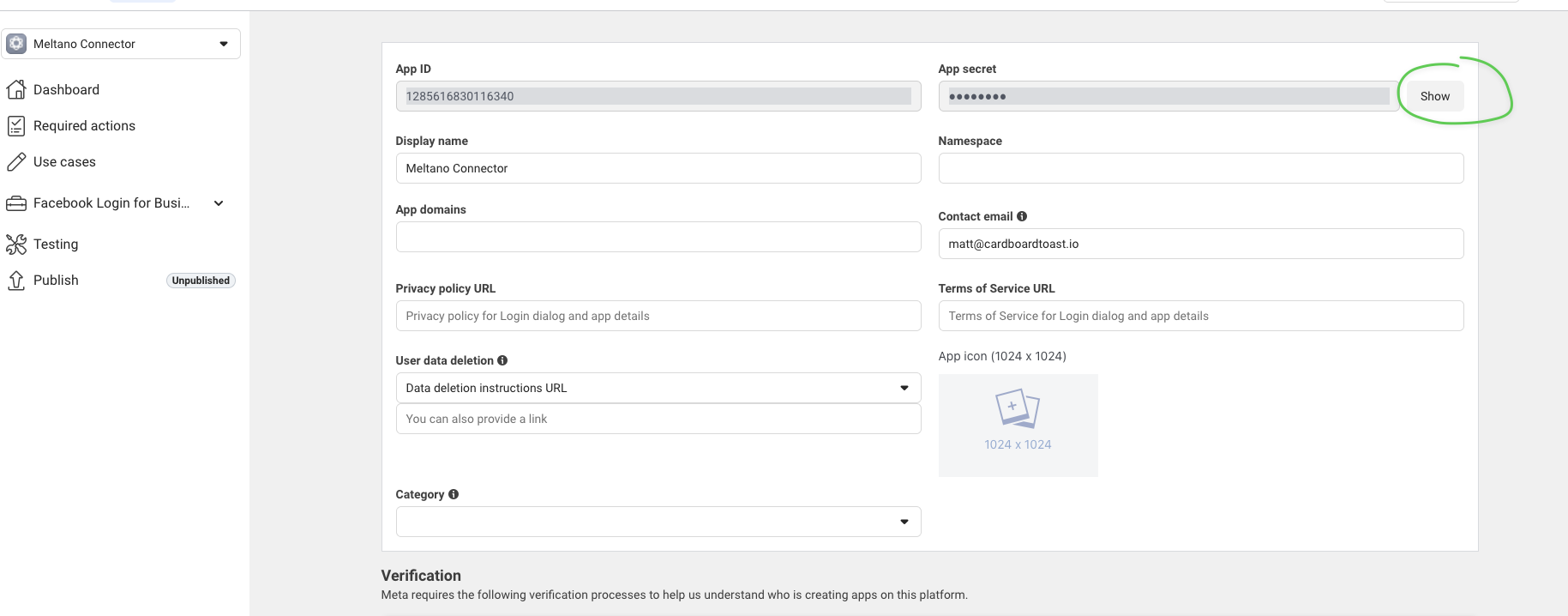
  1. Copy your App ID
  2. Click Show next to App secret, then copy it
Show app secret
Copy the App ID and click Show to reveal the App Secret
Keep These Secure

The App Secret should never be shared publicly or committed to version control.
5 Create a System User

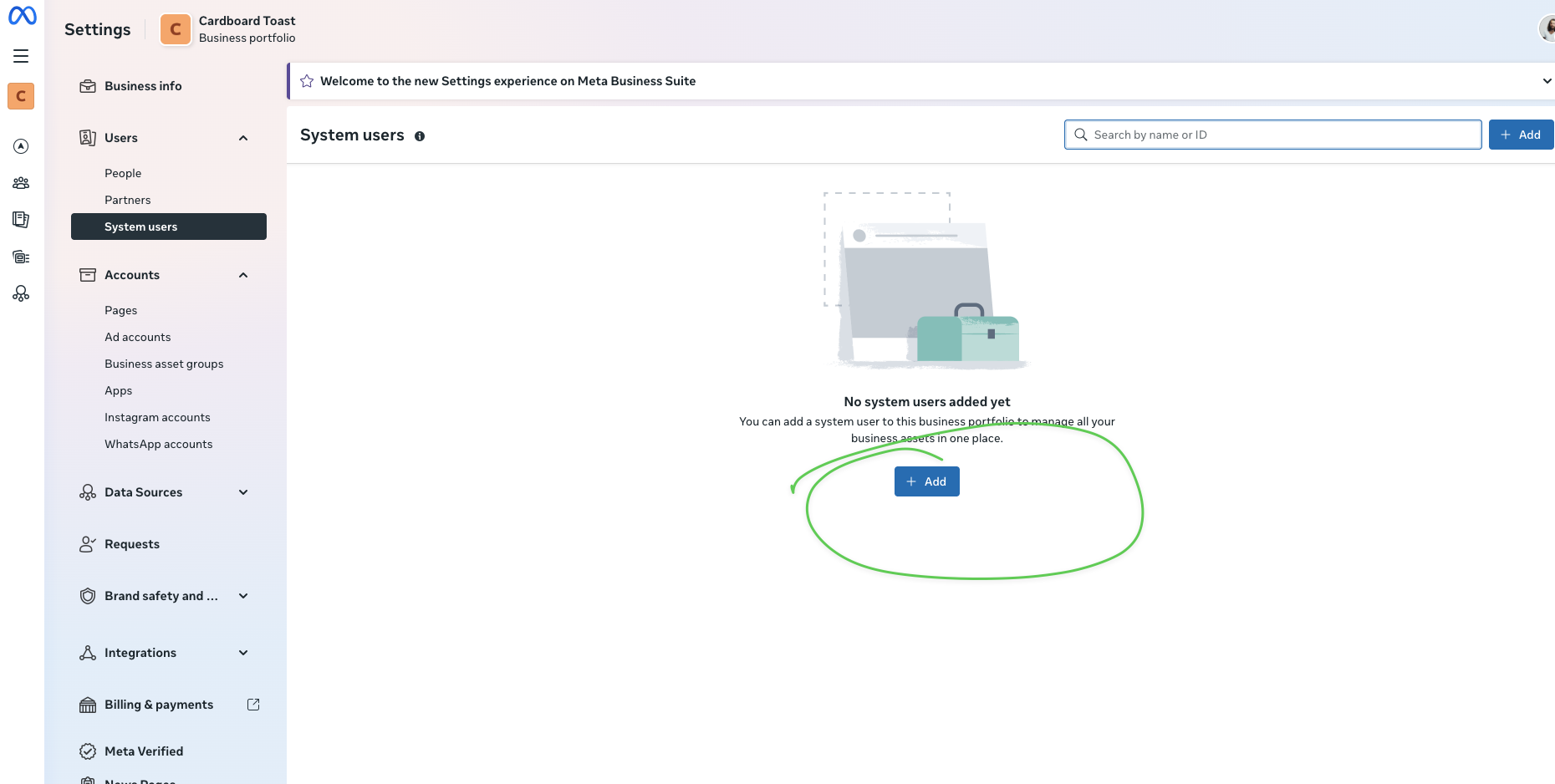
  1. Go back to Business Settings
  2. Under Users, click System users
  3. Click + Add
Add system user
Click "+ Add" to create a new system user
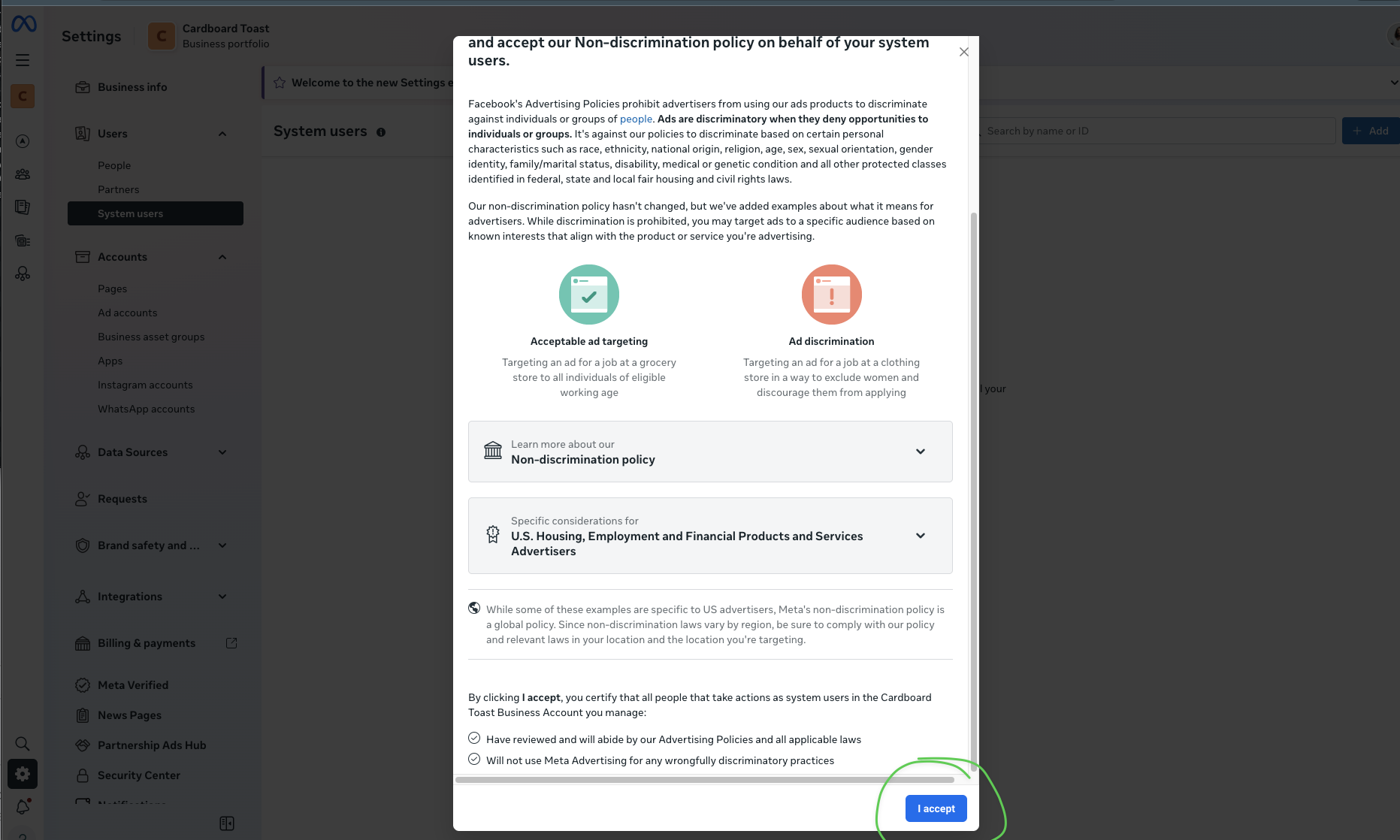
  1. Accept the Non-discrimination policy by clicking I accept
Accept policy
Review and click "I accept"
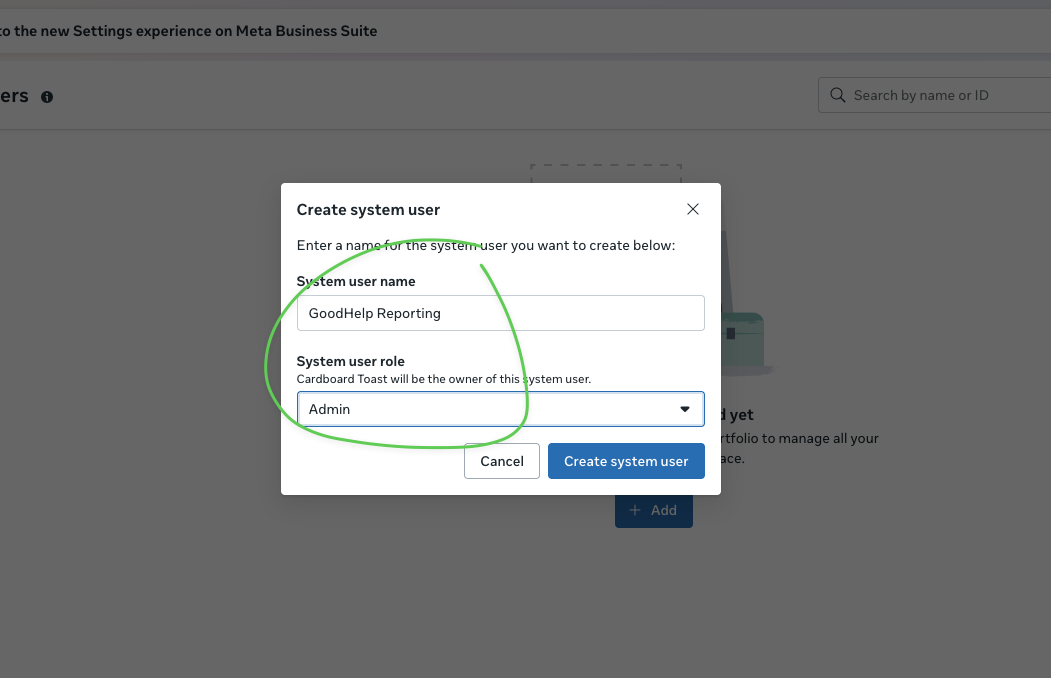
  1. Enter name: GoodHelp Reporting
  2. Set role to Admin
  3. Click Create system user
Set user details
Enter the system user name and set role to Admin

6 Assign Ad Account Access

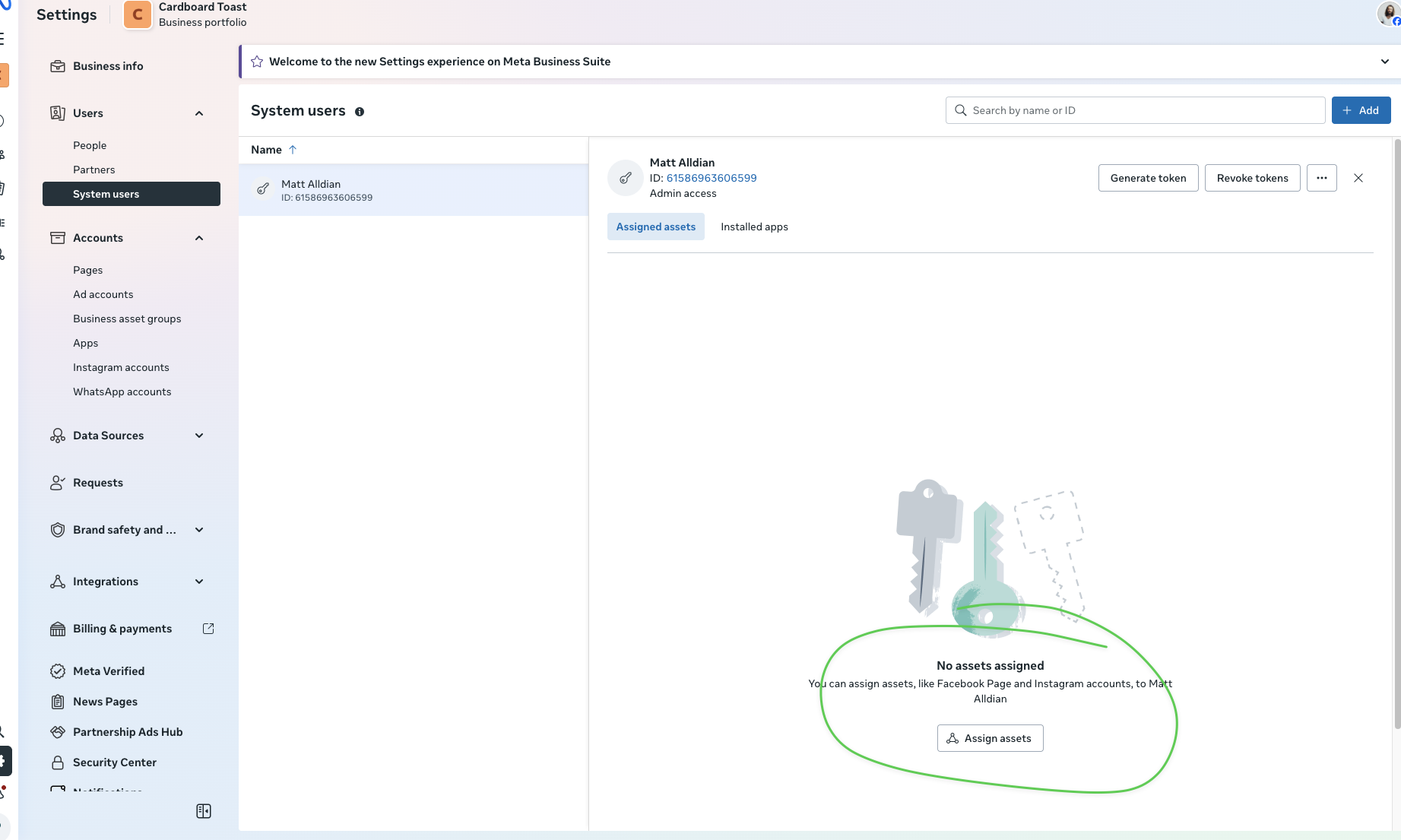
  1. Select the system user you just created
  2. Click Assign assets
Assign assets button
Click "Assign assets" to grant access to ad accounts
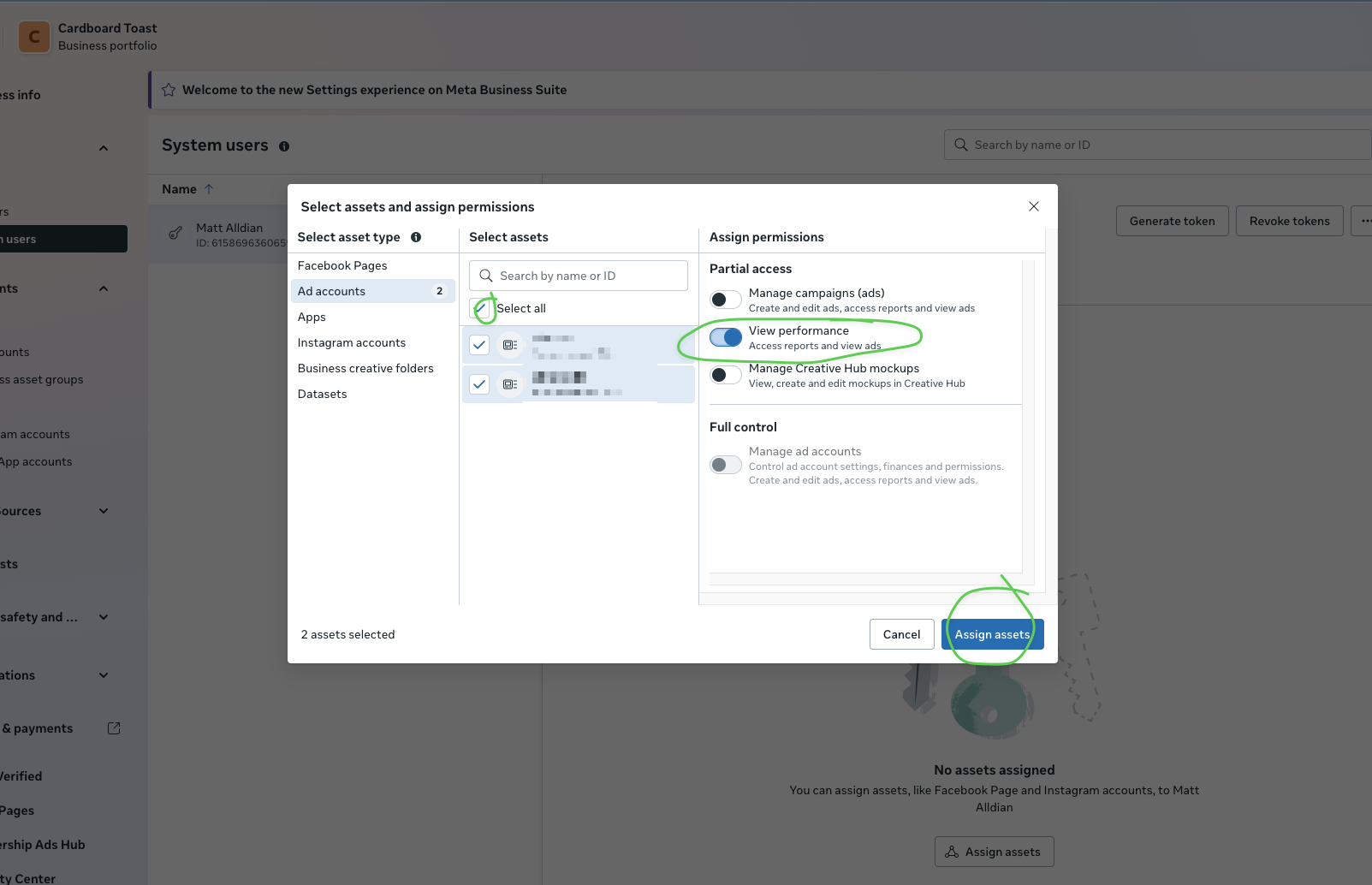
  1. Select Ad accounts from the left panel
  2. Check the ad account(s) you want to grant access to
  3. Enable View performance permission
  4. Click Assign assets
Select assets and permissions
Select Ad accounts, choose your accounts, enable "View performance", and click Assign assets

7 Generate Access Token

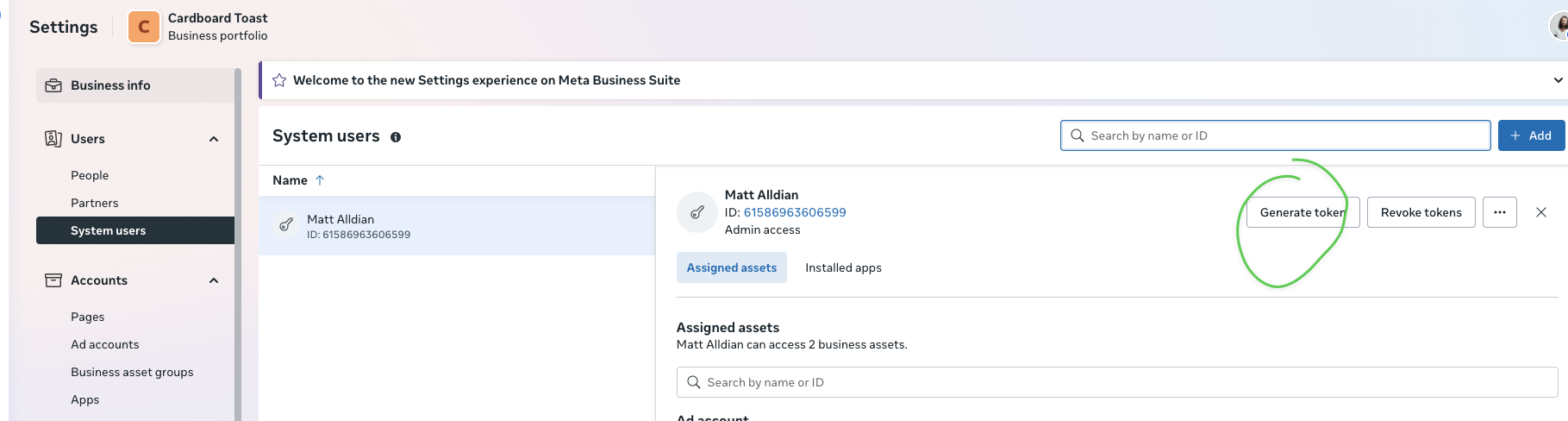
  1. Back on the System Users page, click Generate token
Generate token button
Click "Generate token"
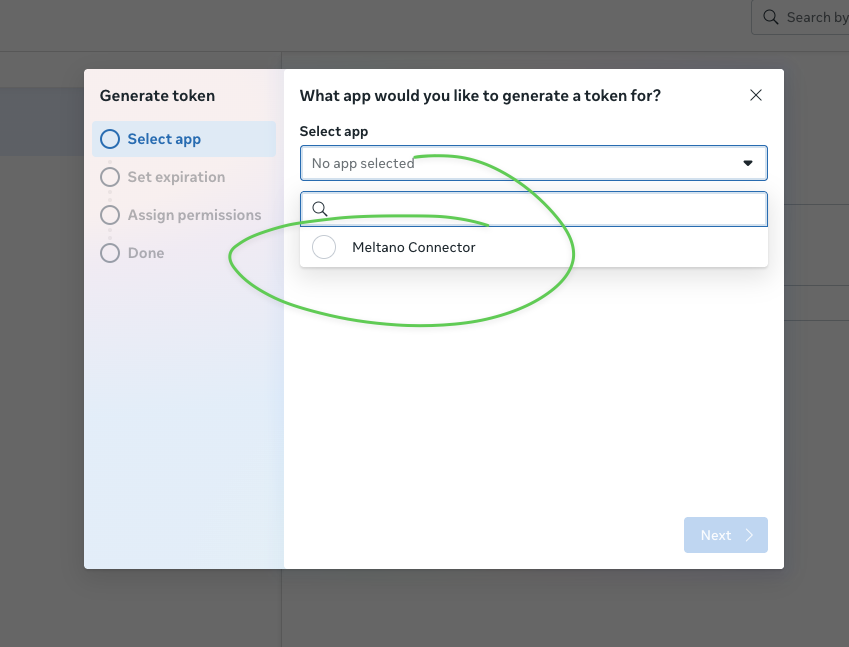
  1. Select your app from the dropdown
Select app
Select your app (e.g., "GoodHelp Reporting")
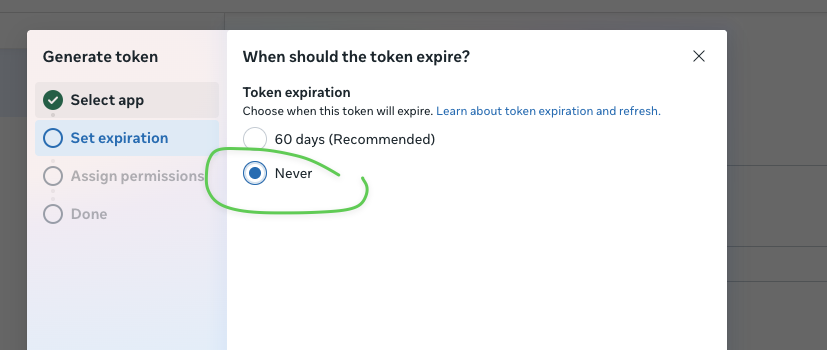
  1. Set token expiration to Never
Set token expiration
Select "Never" for token expiration
Note

If you see "No permissions available", you need to also assign the App as an asset to the system user.
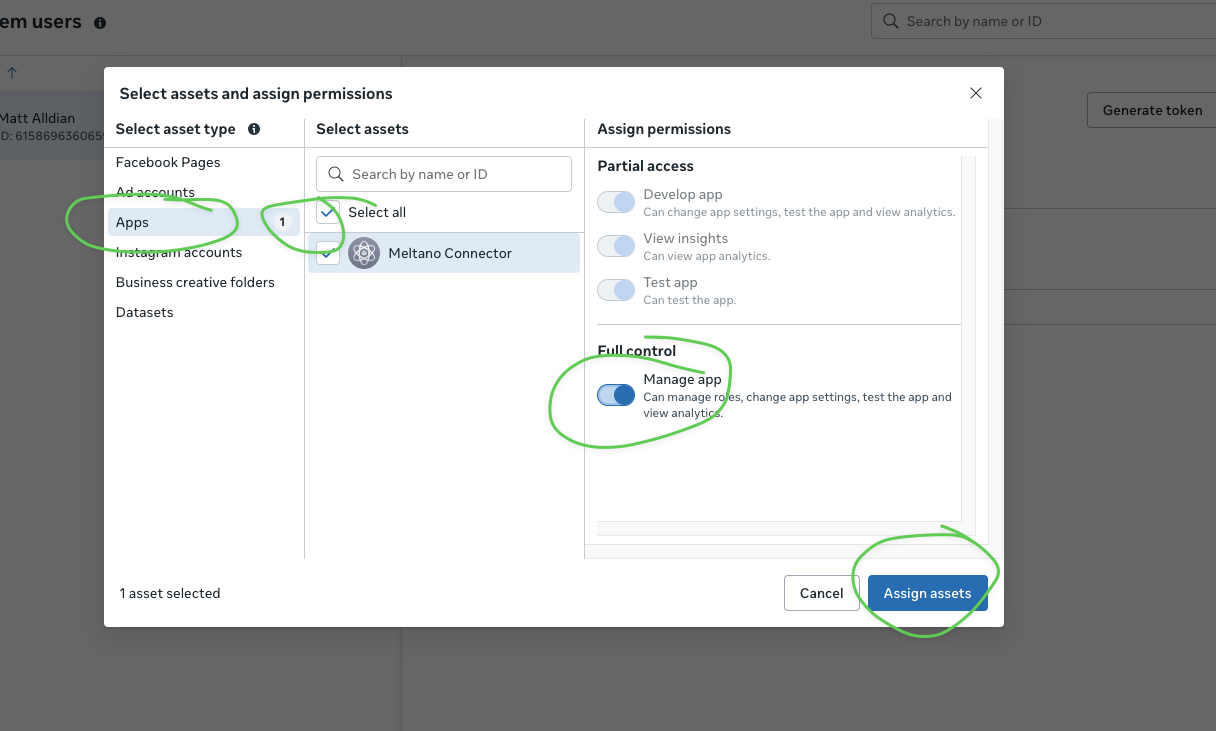
  1. If needed, go back and assign the App as an asset with Manage app permission
Assign app asset
If needed: Assign the App with "Manage app" permission
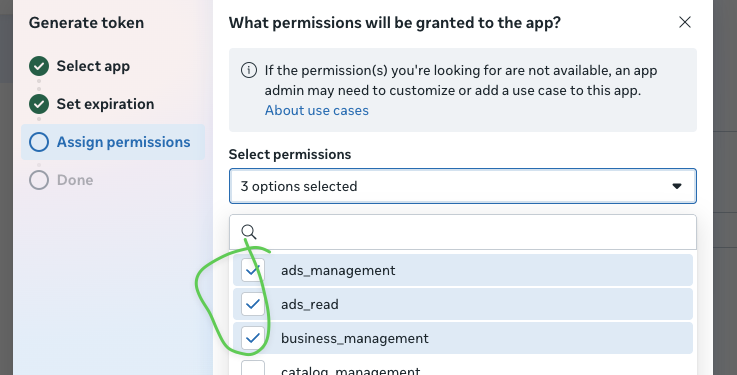
  1. Select the required permissions:
    • ads_management
    • ads_read
    • business_management
  2. Click Generate token
Select permissions
Select the required permissions
Critical

Copy the token immediately. You may not be able to see it again.
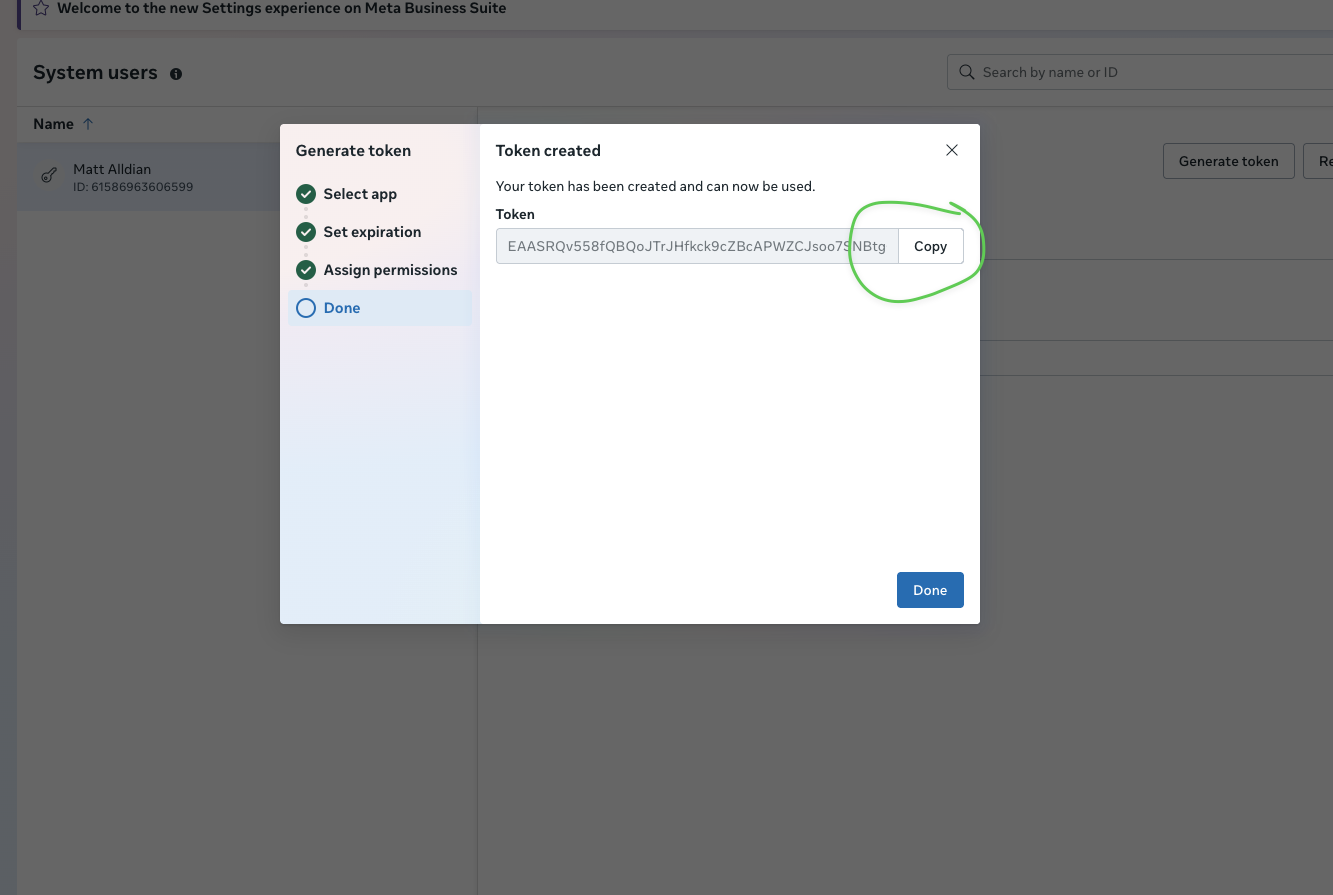
  1. Copy the token using the Copy button
Copy token
Click "Copy" to copy your access token and save it securely

8 Send Us Your Credentials

What We Need Where to Find It Example
App ID App Settings → Basic 1285616830116340
App Secret App Settings → Basic (click Show) ea576f3fa40ee23be...
Access Token From Step 7 above EAASRQv558fQBQ...
Ad Account ID Business Settings → Ad accounts 177503112104493
Slack

Slack Bot Setup

Install the Happy Robots reporting bot to receive daily summaries and alerts in your Slack channels.

What This Does

Installs a reporting bot that posts daily summaries and alerts to your Slack channels. The bot can only post to channels where you've invited it. It cannot read your messages or access data outside of what we explicitly send to it.
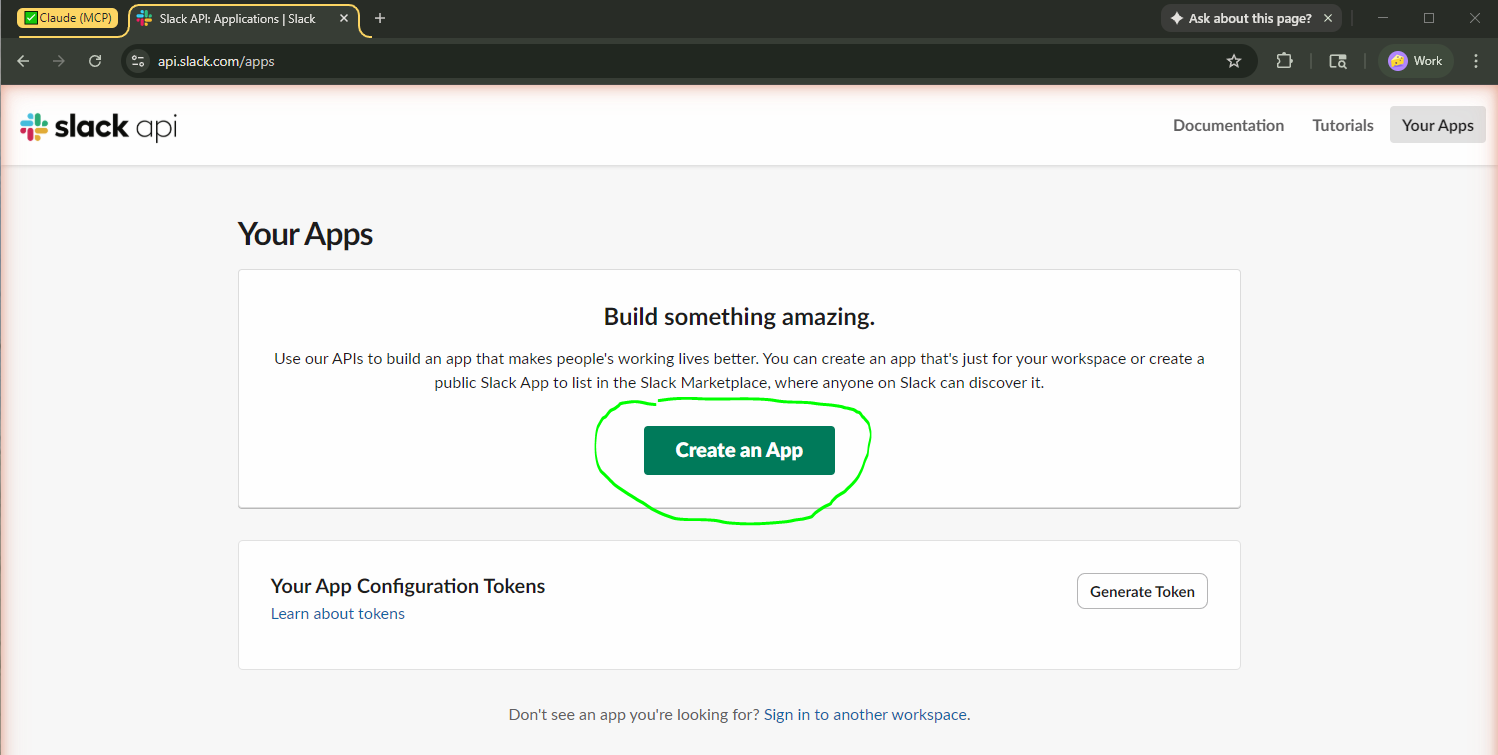
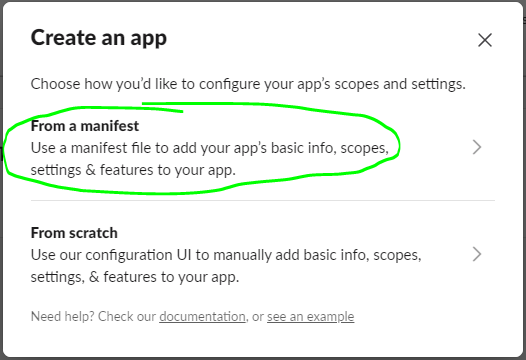
Quick Path api.slack.com/apps → Create New App → From a manifest → Paste JSON → Create → Generate App Token → Install → Copy Tokens

1 Create a Slack App

  1. Go to api.slack.com/apps
  2. Click "Create New App"
Create New App button
Click the "Create New App" button
  1. Select "From a manifest"
From a manifest option
Select "From a manifest" to use our pre-configured settings
  1. Select your GoodHelp workspace from the dropdown
  2. Click Next

2 Paste the App Manifest

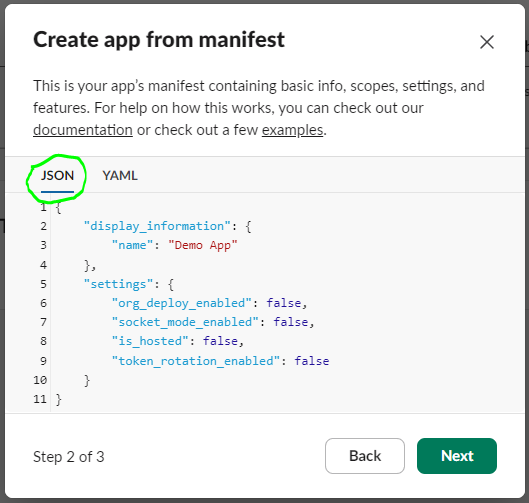
  1. Select the JSON tab at the top of the editor
JSON tab in manifest editor
Click the "JSON" tab to switch to JSON format
  1. Delete any existing content and paste this manifest:
{
  "display_information": {
    "name": "GoodHelp Reporting Bot",
    "description": "Daily ad performance reports and alerts",
    "background_color": "#4a154b"
  },
  "features": {
    "bot_user": {
      "display_name": "GoodHelp Reporting Bot",
      "always_online": true
    },
    "slash_commands": [
      {
        "command": "/adstats",
        "description": "Get ad performance stats for a client",
        "usage_hint": "[client_name] [metric] [date_range]",
        "should_escape": false
      },
      {
        "command": "/qa-review",
        "description": "Start pre-launch campaign QA checklist",
        "usage_hint": "[campaign_name]",
        "should_escape": false
      }
    ]
  },
  "oauth_config": {
    "scopes": {
      "bot": [
        "app_mentions:read",
        "channels:history",
        "channels:read",
        "chat:write",
        "chat:write.public",
        "commands",
        "groups:history",
        "groups:read",
        "im:history",
        "im:read",
        "im:write",
        "users:read"
      ]
    }
  },
  "settings": {
    "event_subscriptions": {
      "bot_events": [
        "app_mention",
        "message.channels",
        "message.groups",
        "message.im"
      ]
    },
    "interactivity": {
      "is_enabled": true
    },
    "org_deploy_enabled": false,
    "socket_mode_enabled": true,
    "token_rotation_enabled": false
  }
}
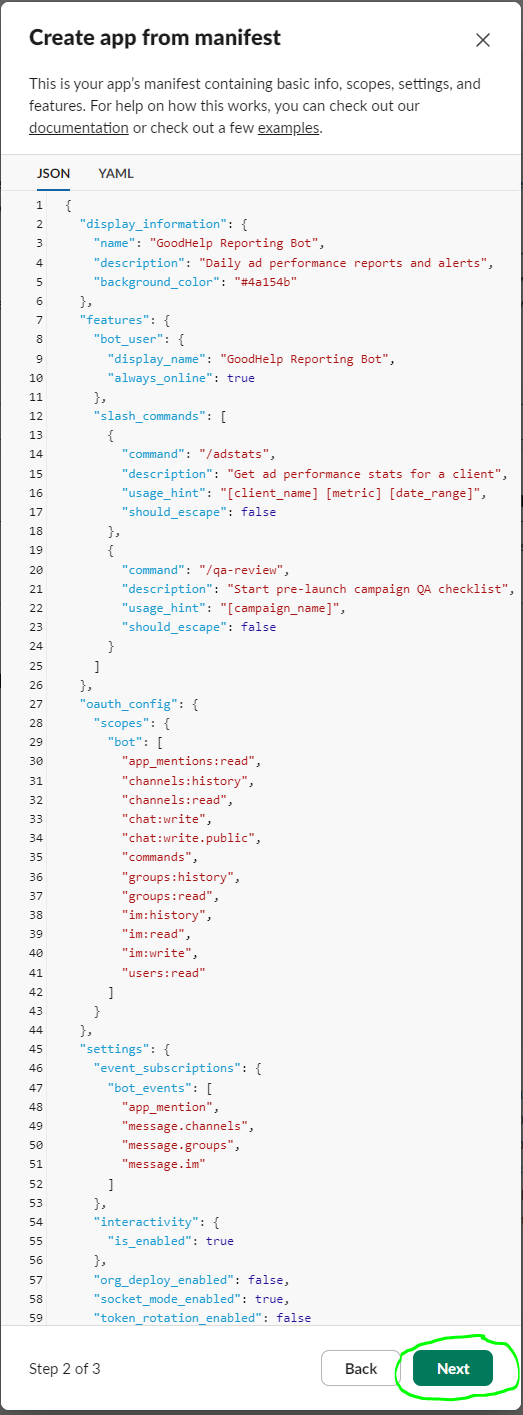
Manifest JSON pasted
Paste the JSON manifest into the editor
  1. Click Next
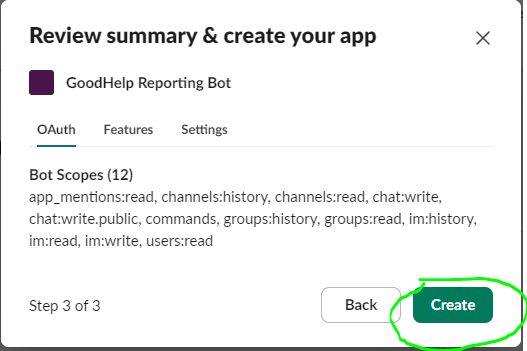
  2. Review the summary and click Create
Review and create
Review the permissions summary and click "Create"

3 Generate App-Level Token

Why This Step?

Socket Mode lets the bot receive slash commands (like /adstats) without needing a public server URL. The App-Level Token is required for this feature.
  1. After creating the app, you'll see the app dashboard
  2. In the left sidebar, click "Basic Information"
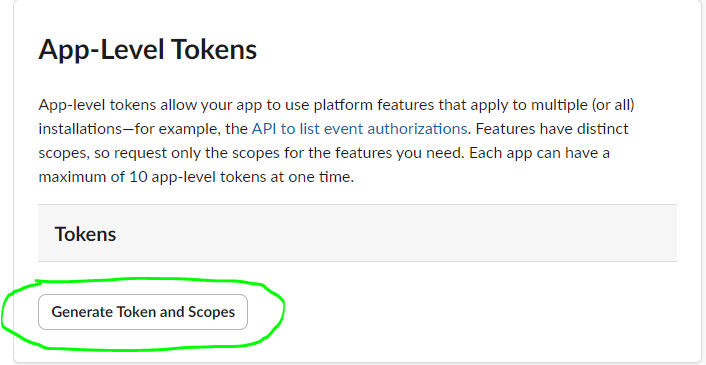
  3. Scroll down to "App-Level Tokens"
  4. Click "Generate Token and Scopes"
App-Level Tokens section
Find "App-Level Tokens" and click "Generate Token and Scopes"
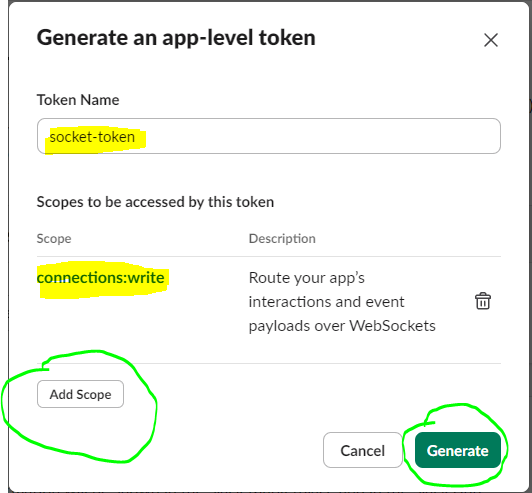
  1. Enter token name: socket-token
  2. Click "Add Scope" and select connections:write
  3. Click "Generate"
Generate token dialog
Enter the token name, add the scope, and click "Generate"
Critical

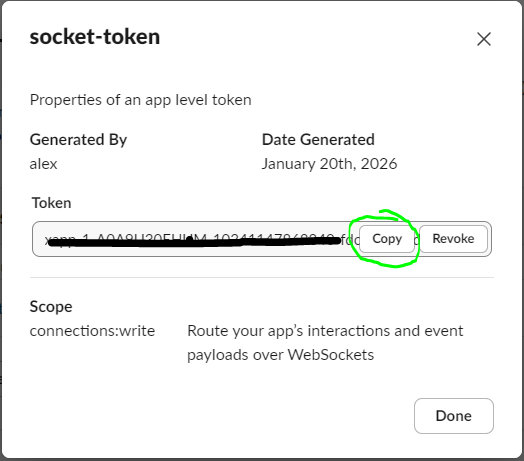
Copy this token immediately and save it securely. It starts with xapp- and you'll need to send it to Happy Robots.

  1. Copy the App-Level Token (starts with xapp-)
Copy xapp token
Copy the generated App-Level Token

4 Install App to Workspace

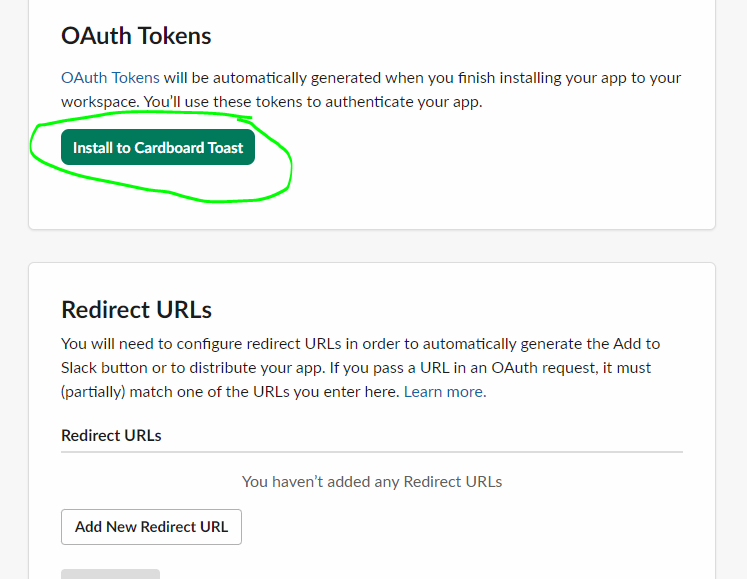
  1. In the left sidebar, click "Install App"
  2. Click "Install to Workspace"
Install to Workspace
Click "Install to Workspace"
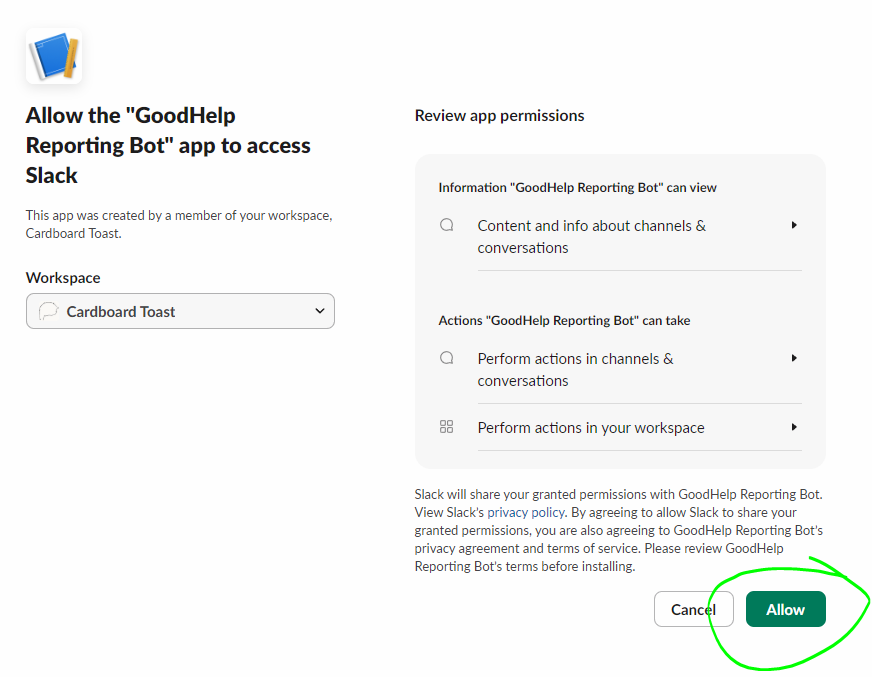
  1. Review the permissions and click "Allow"
Allow permissions
Review permissions and click "Allow"

5 Copy the Bot Token

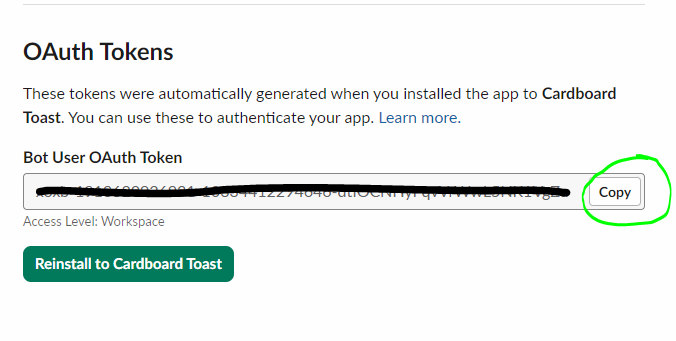
  1. After installation, you'll see the "Bot User OAuth Token"
  2. Click "Copy"
Copy bot token
Copy the Bot User OAuth Token (starts with xoxb-)

6 Get Signing Secret

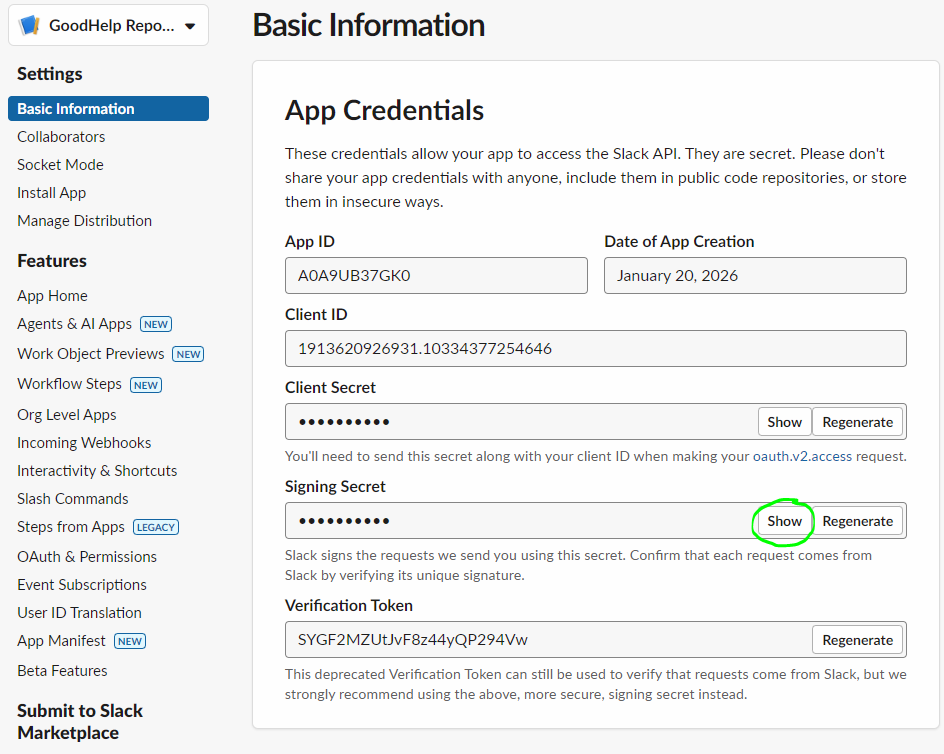
  1. In the left sidebar, click "Basic Information"
  2. Scroll to "App Credentials"
  3. Click "Show" next to "Signing Secret"
  4. Copy the Signing Secret
Signing Secret
Click "Show" and copy the Signing Secret

7 Invite Bot to Channels

The bot needs to be added to each channel where you want reports.
  1. Open Slack (app or web)
  2. Go to each client channel where you want reports
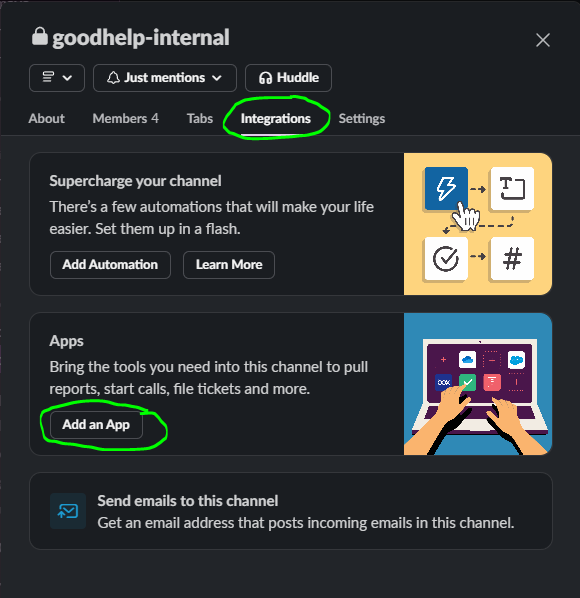
  3. Click the channel name at the top
  4. Go to "Integrations" tab
  5. Click "Add apps"
  6. Search for and add "GoodHelp Reporting Bot"
Add bot to channel
Add the bot to each channel where you want reports
Note

Repeat this for each channel where you want the bot to post reports.

8 Get Channel IDs

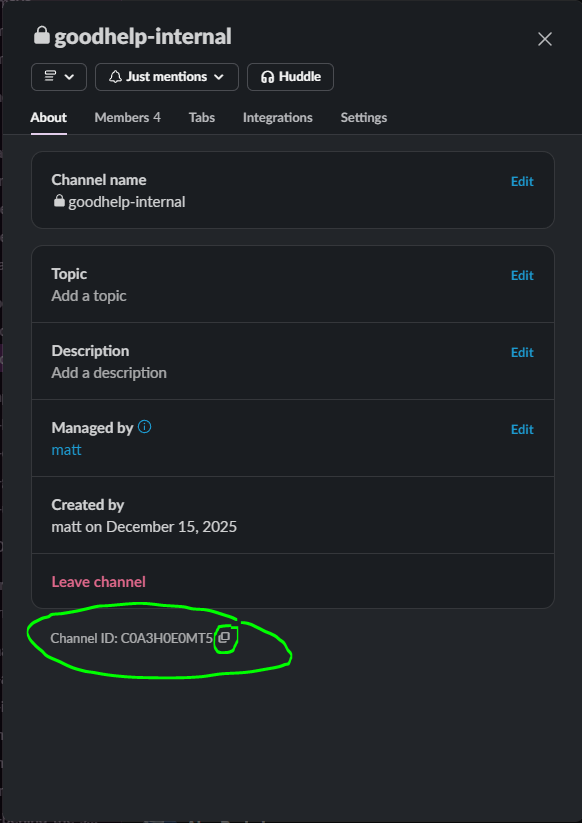
For each channel where you added the bot, get the Channel ID:

  1. Right-click on the channel name in the sidebar
  2. Click "Copy link"
  3. The URL looks like: https://workspace.slack.com/archives/C01ABCD2EFG
  4. The C01ABCD2EFG part is the Channel ID
Get Channel ID
Right-click the channel and click "Copy link" to get the Channel ID

9 Send Us Your Credentials

Send the following credentials securely to Happy Robots:

What We Need Where to Find It Example
App-Level Token Basic Information → App-Level Tokens xapp-1-A0A9UB37...
Bot User OAuth Token OAuth & Permissions page xoxb-1234-5678-AbCdEf...
Signing Secret Basic Information → App Credentials a1b2c3d4e5f6...
Channel IDs Right-click channel → Copy link C01ABCD2EFG
Workspace Name Your Slack URL goodhelp.slack.com
Security Note

These credentials let the bot post to your Slack. We store them encrypted and never share them. The bot cannot read your messages—it can only post to channels where you've invited it. You can remove it anytime from Slack Admin → Manage Apps.

Reddit

Reddit Ads API Setup

Connect your Reddit Ads account to enable automated reporting. We only request read permissions—we cannot modify your campaigns or access payment information.

Important

Reddit has updated their API policies. Apps must be created through the Reddit Ads Manager portal—not the general reddit.com/prefs/apps page.

Quick Path ads.reddit.com → Business Manager → Developer Applications → Create App → Authorize

1 Find Your Account ID

  1. Go to ads.reddit.com
  2. Log in with your Reddit account
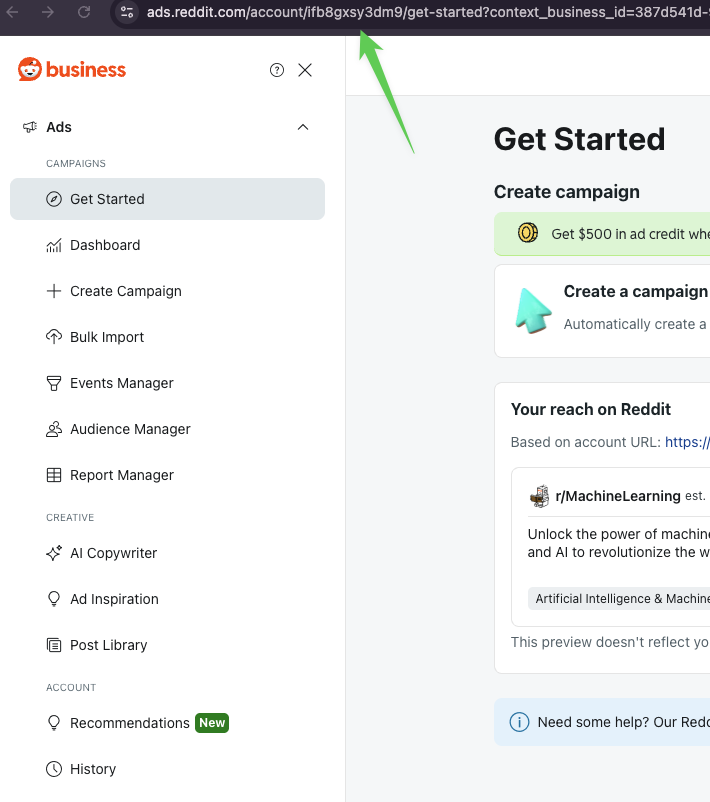
  3. Look at the URL in your browser's address bar
  4. Find the account identifier after /account/
Reddit Ads Manager URL showing account ID
The account ID appears in the URL (e.g., ifb8gxsy3dm9)
Important: Add the a2_ prefix

The URL shows the raw ID, but the API requires an a2_ prefix.
URL shows: ifb8gxsy3dm9
API format: a2_ifb8gxsy3dm9
2 Navigate to Developer Applications

  1. In Reddit Ads Manager, click on your Business name in the top navigation
  2. Select Business Manager from the dropdown
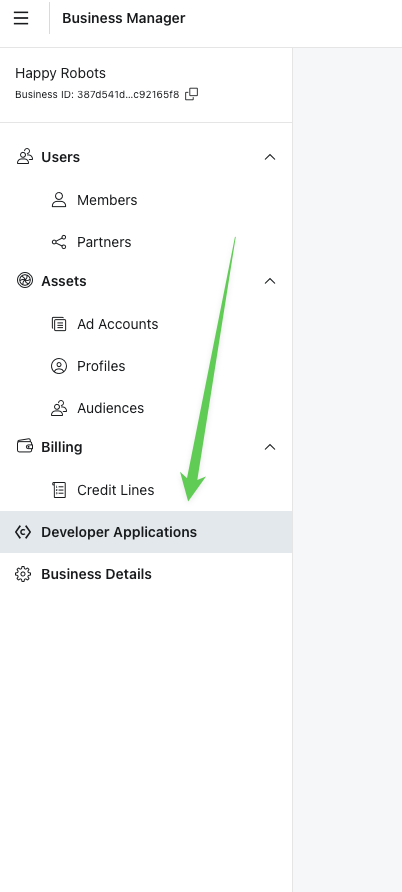
  3. In the left sidebar, scroll down and click Developer Applications
Business Manager sidebar with Developer Applications highlighted
Find Developer Applications in the Business Manager sidebar

3 Create a New App

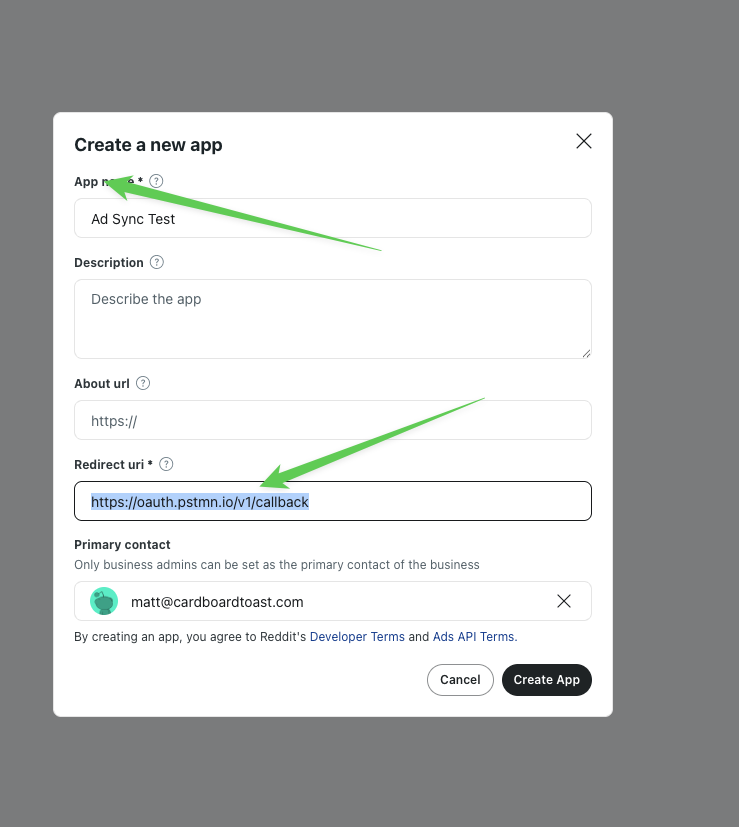
  1. Click Create App button
  2. Fill in the form:
Field Value
App name GoodHelp Reporting (or any descriptive name)
Description Optional - leave blank
About URL Optional - leave blank
Redirect URI https://oauth.pstmn.io/v1/callback
  1. Click Create App
Create app modal with fields filled in
Enter your app name and the Postman redirect URI
Why Postman's callback URL?

This allows us to capture the authorization code without running a local server. It's a standard OAuth testing endpoint.

4 Copy Your App Credentials

After creating the app, you'll see your credentials displayed:
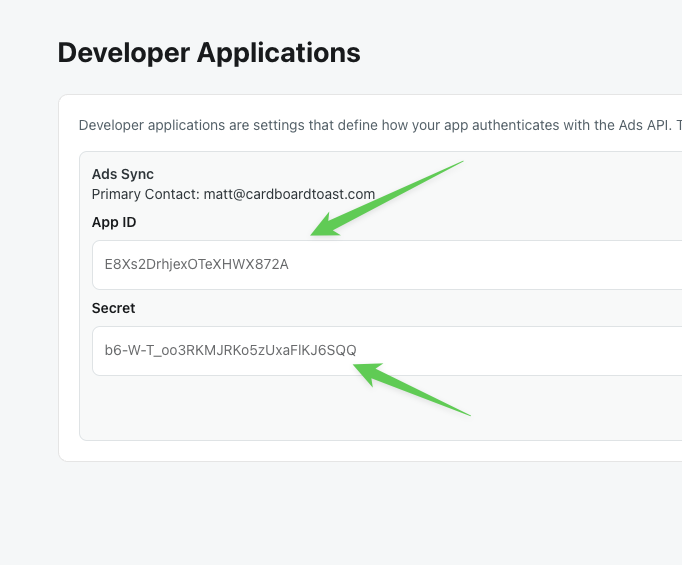
Developer Applications page showing App ID and Secret
Copy both the App ID and Secret
Save these credentials now

Copy both values to a secure location. You'll need them for the next steps.

5 Build the Authorization URL

To connect the app to your Reddit account, you need to open a special authorization URL in your browser.

Replace YOUR_CLIENT_ID with your App ID from Step 4, then open this URL:

https://www.reddit.com/api/v1/authorize?client_id=YOUR_CLIENT_ID&response_type=code&state=random123&redirect_uri=https://oauth.pstmn.io/v1/callback&duration=permanent&scope=adsread,history

Example with a real Client ID:

https://www.reddit.com/api/v1/authorize?client_id=E8Xs2DrhjexOTeXHWX872A&response_type=code&state=random123&redirect_uri=https://oauth.pstmn.io/v1/callback&duration=permanent&scope=adsread,history
Common Error: Invalid Scope

Make sure the scope is adsread (no underscore). Using ads_read will cause an "invalid scope" error.

6 Authorize the App

After opening the authorization URL:

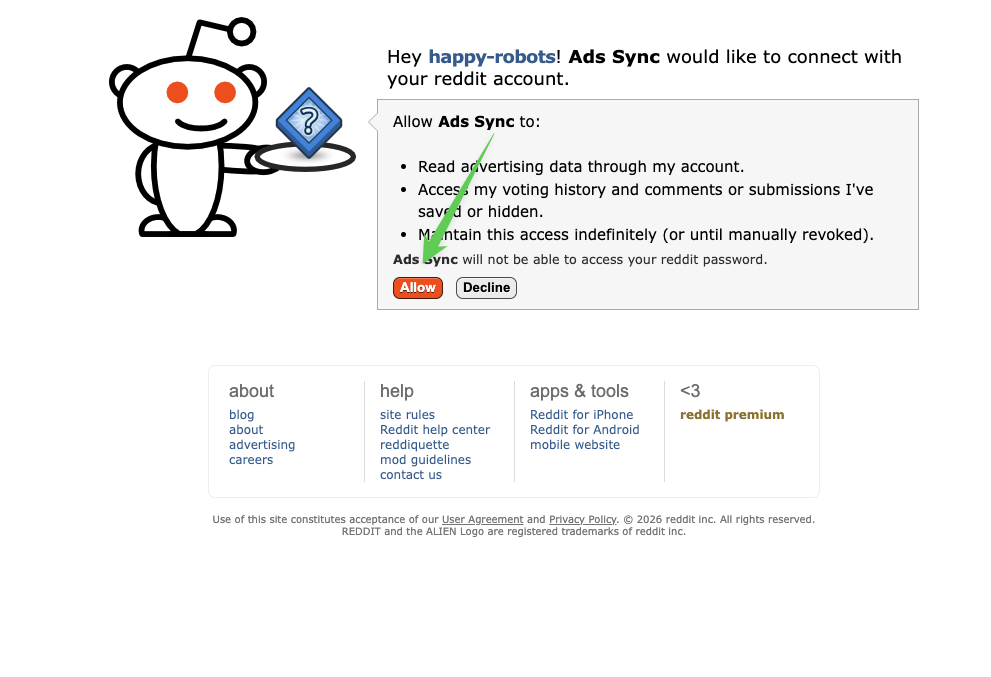
  1. You'll see Reddit's authorization page asking for permissions
  2. Review the permissions being requested:
    • Read advertising data through my account
    • Access voting history and comments (required for OAuth)
    • Maintain this access indefinitely
  3. Click Allow
Reddit OAuth authorization page
Click Allow to grant read access to your ads data
Security Note

The app will NOT be able to access your Reddit password or make changes to your campaigns. This is read-only access for reporting purposes.

7 Copy the Authorization Code

After clicking Allow, you'll be redirected to Postman's callback page:

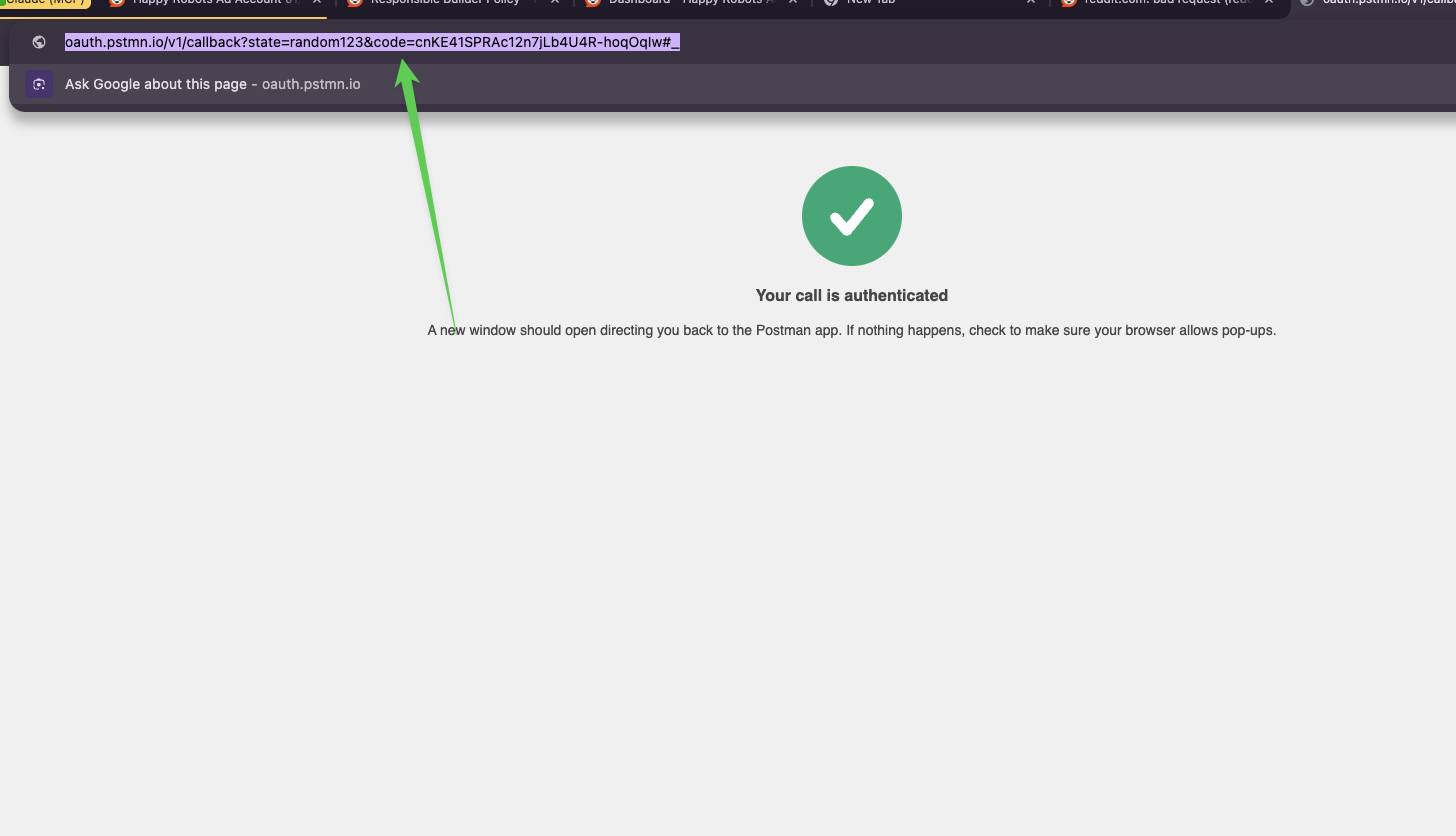
  1. Look at the URL in your browser's address bar
  2. Find the code= parameter
  3. Copy everything between code= and #_
Postman callback page with authorization code in URL
Copy the code from the URL (highlighted portion)

Example URL:

https://oauth.pstmn.io/v1/callback?state=random123&code=cnKE41SPRAc12n7jLb4U4R-hoqOqIw#_

The code in this example is: cnKE41SPRAc12n7jLb4U4R-hoqOqIw

8 Send Us Your Credentials

Credential Where to Find It Example Format
App ID (Client ID) Developer Applications page E8Xs2DrhjexOTeXHWX872A
Secret (Client Secret) Developer Applications page b6-W-T_oo3RKMJRKo5zUxaFlKJ6SQQ
Account ID URL in Ads Manager (with a2_ prefix) a2_ifb8gxsy3dm9
Authorization Code Postman callback URL cnKE41SPRAc12n7jLb4U4R-hoqOqIw
That's it!

Once we receive your credentials, we'll complete the setup and confirm when your Reddit Ads data is flowing into your dashboard.

? Troubleshooting

"I can't find Developer Applications"

Make sure you're in the Reddit Ads Manager (ads.reddit.com), not regular Reddit. Look under Business Manager in the sidebar.

"reddit.com/prefs/apps is blocked"

This is expected. Reddit now requires apps to be created through the Ads Manager portal. Use the Developer Applications section in ads.reddit.com instead.

"Invalid scope error during authorization"

Contact us—we'll send you a corrected authorization link.

"Account not found" errors

Make sure your Account ID includes the a2_ prefix. Example: a2_ifb8gxsy3dm9 not just ifb8gxsy3dm9.